











When I started in book publishing almost twenty years ago, I was clueless about book design, but I knew what I liked. I was drawn to covers that were clean, professional, and polished. Cluttered covers were distracting, and trendy, cookie-cutter covers fell flat. Books that grabbed my attention were the ones that stood out in their own unique way, not in a gawdy, over-the-top display, just something that called to me on a deeper level and said “I am worth your time.”
Call it book cover snobbery, but there are SO many books on the market and not enough time to search them all, so something has to be the great differentiator. It turns out that this way of analyzing book covers came in handy when I started designing book covers for authors. It allowed me to design books from the buyer’s perspective because I was a buyer first.
If you can begin the book cover design process with a clean, professional, and polished foundation, everything else, as they say, is figure-out-able.
Whether you’re roaming the aisles of your local Barnes and Noble or scrolling through the never-ending book database on Amazon, consider what causes you to pick up a book or stop scrolling. Consider this when designing your book cover for your audience.
According to The Book Smuggler, 79% of people say book cover designs play a decisive role in their decision to purchase a book. Are you one of the 79%? I am!
Let’s learn what it takes to design a book cover that sells.
Our book cover design how-tos:

How much does it cost to design a book cover?
On average, you can expect to spend anywhere from $50 – $500 for a book cover design that’s professionally crafted.
When self-publishing, expenses should be expected; however, they can vary. The total cost of your book cover design will depend on a few key factors.
Book cover rates depend on the following:
- Cover designer’s experience
- How intricate your book cover is
- The time it takes to design
- The number of options
- The cover designer’s level of expertise
- The cover designer’s demand for work
- Your book’s genre
Remember that your book’s cover is its first impression, even before book editing, so you want to leave a lasting one. Without a fantastic cover, a reader may never open the book to see what’s inside.
How long does it take to design a book cover?
The timeline for book cover design can vary from artist to artist. On a site like Fiverr, you can get a book cover designed in as little as 24-48 hours, but a professional, in-demand, cover designer with best-selling book covers may be booked out for months.
Overall, we recommend our students allot roughly three weeks from initial touchpoint (including revisions) to self-publishing your book to ensure your cover is fully complete before your book launch.
Keep in mind that if you hire someone to design your book cover, they may not be available immediately. The best practice is to reach out a few months before launching your book to ensure there’s enough time..
Design your own book cover
We will always recommend that you work with a professional cover designer, whether with us or someone else. However, if professional book cover design is not in your budget or you’re the creative type and want to give it a go yourself, here are some suggestions for doing it yourself.
Step 1 – Develop book cover ideas
I like to save book cover ideas for inspiration. It’s nice to see what’s trending for a certain genre or interesting cover ideas to consider. When designing your book, it’s helpful to have book cover ideas in mind so you don’t have to start from scratch. You may not know exactly what you want at first, but having a direction can save you a lot of time and frustration.
Studying other covers also gives you a feel for what you like and don’t like. I mentioned at the start of this article that I like clean covers, rather than cluttered ones; however, a “cluttered” cover could work for a book, depending on the book’s genre and ideal reader. For example, this cover design for Truth Like Oil has a lot happening, but the design is intentional, and through the strategic placement of imagery and color, readability is not lost.

Your first step for designing your own book cover is compiling all these ideas into a single place.
You can find book cover ideas in all of these places:
- Pinterest – sign on to Pinterest and look up “book covers” to get a ton of brilliant covers all in one place. This is also a great place to create a board specifically to save book covers for future reference.
- Goodreads – There are so many books on Goodreads for you to look at as covers inspiration. You can even simply add these to your “to be read” list in order to save them for reference as well.
- Google book cover ideas – Others have already done the work for you! Just go to Google and type in “book cover inspiration” and click on the “images” tab to be greeted with tons of great options you can save.
- Peruse Amazon in your book’s genre – This is by far the best method for coming up with book cover ideas. Simply go to your book’s genre by navigating to books > your genre > subgenre and look at the typical covers of bestselling books, like in the image below.
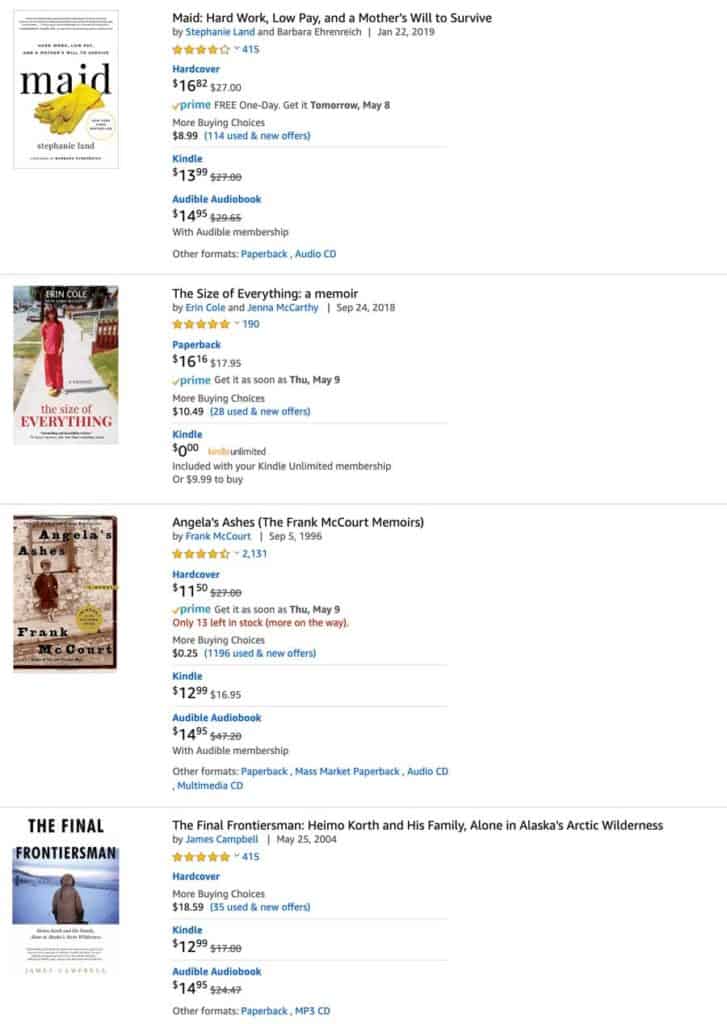
It’s okay to break the rules of good design, just make sure you know what you’re doing. If you’re new to design, keep things simple at first and stretch the boundaries as your skills grow.
Step 2 – Find the best images for your cover
Once you have an idea for your book, you may need to outsource the images.
We highly recommend royalty-free stock photos (if you can’t have professional ones taken) because they are readily available, unlike some third-party images you might find on Google or other sources.
Here are a few places you can get free photos for your book cover:
If you do want to level up with stock photos, consider purchasing a license from a reputable stock photo site.
Here’s where you can find paid stock images:
Step 3 – Choose book cover typeface
Typeface matters! Often confused with “font”, typeface refers to the family of lettering like Times Roman, Roboto, or Anton, where font refers to the style of the lettering, like bold, italics, condensed, etc. Depending on your genre, the style of your book, and even the vibe or voice you want to convey, your book cover’s typeface can make a major difference in how potential readers view your book.
Consider the example covers below and the difference that changing the typeface can make—same title, different mood.
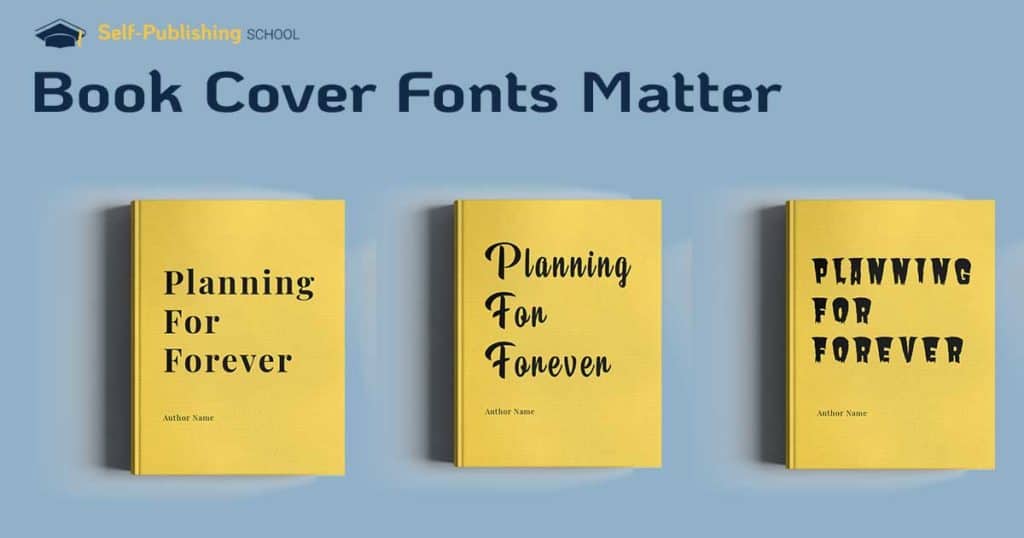
Make sure that the typeface you select fits the message, tone, and the audience you’re trying to reach.
Step 4 – Find the right book cover dimensions
Book cover dimensions matter, especially within certain genres. Unlike children’s books that come in all shapes and sizes, most general fiction and nonfiction books have narrower size expectations. For example, you might be thrown off to see a cozy mystery, or an urban thriller in an 8.5 x 11″ spiral-bound hardback. Sure, it’s the same story inside, but the unusual size and format might be off-putting for potential readers.
When it comes to cover dimensions, try to stick to the norm, unless there’s a REALLY good reason for throwing out convention,
What are the proper book cover dimensions?
This is often your call, but the most common paperback book dimensions are 6″ by 9″ (15.24 x 22.86 cm).
This doesn’t mean you have to use this size, but this is the most common size for a paperback book, and is Amazon’s default book dimension option if you publish through them.
Here are more book cover dimensions for the multiple platforms you may publish on:
| Publishing Platform | File Format | Book Cover Size (suggested) | Cover Size Requirements |
|---|---|---|---|
| Amazon KDP | JPEG or TIFF | - 2560 x 1600 pixels - Ratio of 1.6:1 | Between 1000 x 625 pixels AND 10000 x 10000 pixels. One side must be at least 1000 pixels long/wide. |
| Barnes & Noble | JPG or PNG | - Height and width of 1400 pixels minimum | 750 pixels minimum for height and width |
| Apple iBooks | JPG or PNG | - 1400 x 1873 px - 1600 x 2400 px | 1400 pixels wide as a minimum |
| Draft 2 Digital | JPEG | - 1600 x 2400 pixels | Tall rectangle of 1600 wide and 2400 pixels long |
| Kobo Books | JPG or PNG | - 1600 x 2400 pixels | 1400 pixels wide as a minimum |
Step 5 – Use free or paid cover design software
Now it’s time to put everything you’ve created and gathered together and design your actual book cover.
There are many free and paid options to choose from.
You don’t have to be an expert designer to create a great cover, but you do have to use certain methods to make it look professional and appealing to your reader (and we’ll cover professional book designs in a bit).
Similar to writing software, design software gives you the support you need to create an aesthetically pleasing design without needing years of design experience.
Here are our top free book cover designs software to use:
- Canva (Free and paid option(
- Adobe Spark
- Graphic Springs
- Design Wizard
These are design software that are more advanced, and therefore not free:
- Photoshop – $9.99/month
- Adobe Illustrator – $31.49/month
- Affinity Designer – $$69.99 (one-time fee)

Step 6 – Create 3 different cover options
Instead of creating one cover, make three different covers to test the market, then ask your audience what they think.
When you only make one cover, it might not be the best design to maintain high book sales, so it’s always a good idea (if you can) to ask your potential readers for input. Ultimately, the final decision is yours, but getting additional insight can help you make a balanced decision. Just make sure that the input you consider is constructive.
Step 7 – Test your book cover options with an audience
You can’t possibly know what will resonate well with your audience. Sure, if you’ve done your book research on your specific genre, you’ll have a good idea, but that’s not always a sure thing.
We’re often too close to our books to accurately determine what’s best.
Fresh eyes can make a difference.
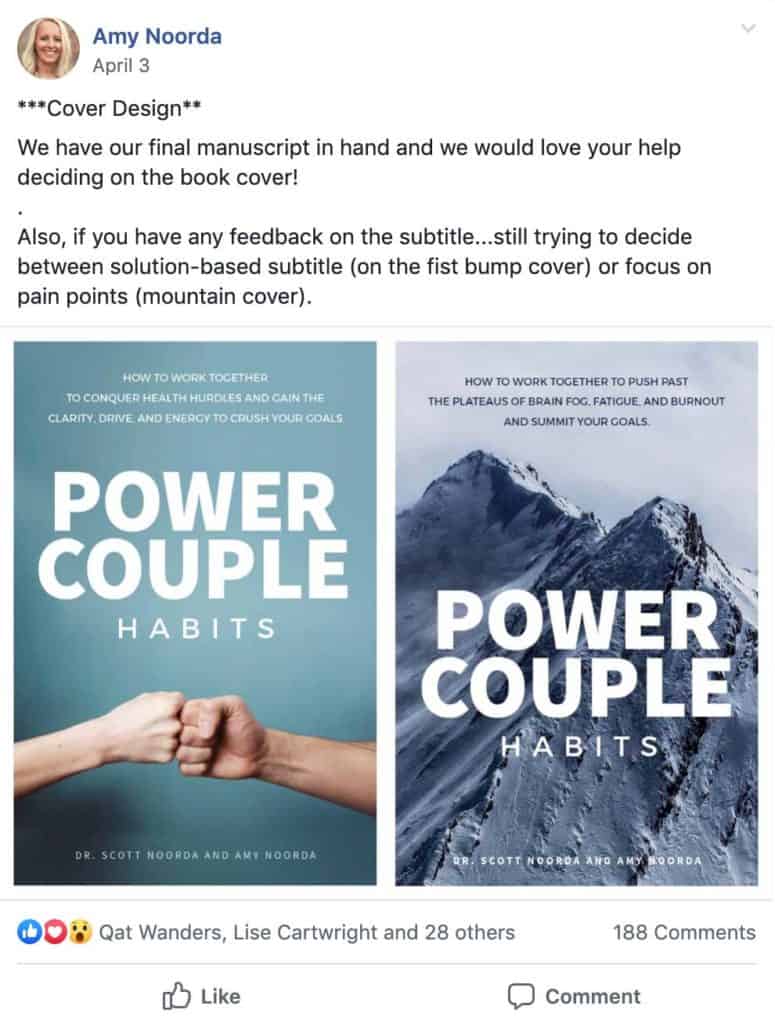
We recommend joining a group (for our students, it’s our Mastermind Facebook group) or sending your cover options to a group of people in order to get feedback. When selecting readers, make sure they are already readers of your book’s genre, since book covers are usually genre-specific.
Here’s an example of one of our students posting their cover for feedback in our group:
Hire a professional book cover designer
If designing the cover yourself is not ideal, a professional designer can lift the burden. Learn how we can help you with book cover design and other book production services. Book a call with our team.
There are tons of advantages to using Self-Publishing School designers or another professional book cover designer instead of doing it yourself:
- They can create custom designs.
- They have industry experience and insight.
- They can offer a high-quality finished product.
There are many ways to hire a cover designer, one of which we discuss in the video below. Following our steps will help you get the best cover possible.
Step 1 – Put together book cover inspiration
Much like we discussed in the section on creating your own book cover, there are so many ways to find cover designs you like.
Pinterest is a great place to start, but you can also try design sites like 99 Designs or Dribbble. Search for book cover inspiration on Google, or try Amazon to find what covers are performing best.
When collecting your favorite book covers, make sure they can be shared.
They are the professionals, but giving them some ideas on the direction you’d like to take the book in can be helpful.
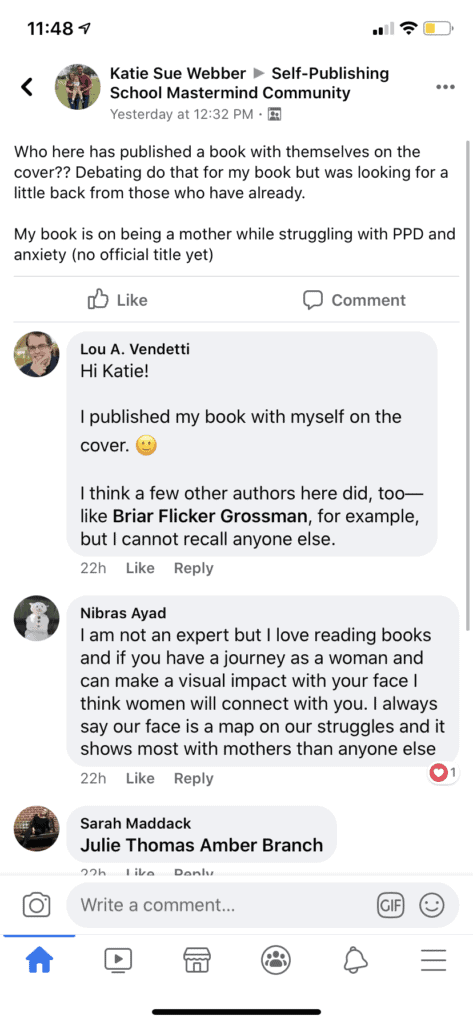
You might also consider putting yourself on the book cover, with a professional image—no selfies!
Here’s a student from our exclusive Mastermind Community getting some thoughts on adding yourself to a book cover:
Step 2 – Research popular book covers in your genre
If you hire a designer within your genre, they should already have a good feel for what will work, but it’s also a good idea for you to do your own research. Remember that the final decision begins and ends with you as the publisher, so being informed about genre expectations is a good way to understand the design process and ask specific questions when needed.
Step 3 – Hire a book cover designer you like
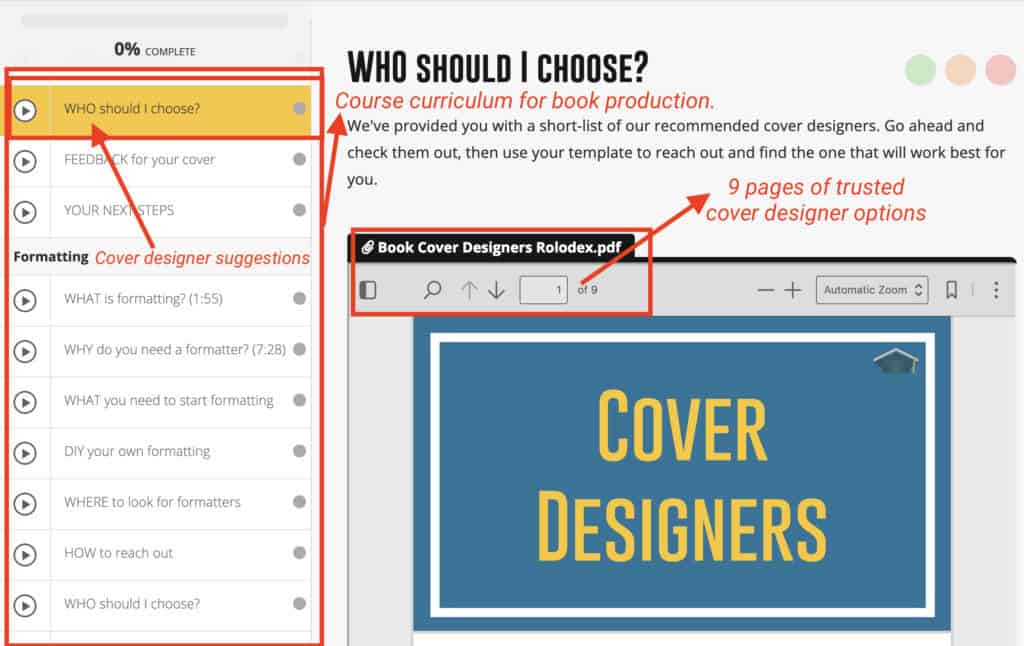
Finding a cover designer can be tricky. Here at Self-Publishing School, we have two options that can help you: 1) we can design the cover for you, or 2) we can provide you with a preferred list of talented book cover designers (as seen in the image below). In both cases, our students can cut down on expenses and time spent searching.
Here are additional places to find professional designers:
- If you’re a student of ours, contact your Done-for-You representative or go to the preferred outsourcer list featured above in your program
- Ebook Launch
- Fiverr
- Upwork
- Reedsy
- 99 Designs
- ELP Publishing
- 17 Studio Book Design
- Google and research freelance book cover designers
- Bespoke Book Covers
- 100 Covers
Step 4 – Communicate your ideas about the book cover
Once you find the right designer for your book, it’s important to talk to them about your cover ideas.
Be as clear with your design as you can about what you want and expect for your book cover.
They are the experts, but it’s critical that you convey clearly what you like and don’t like. Provide examples when possible, and be respectful of their expertise. If they ask what your book is about, give them the core elements, style, and tone you want it to have, along with who your audience is.
Working with a designer is a partnership, so be open to their suggestions, but don’t be a pushover. You want the best book possible for your audience, but you also want to be pleased with the final product.
Step 5 – Ask for 1-3 options
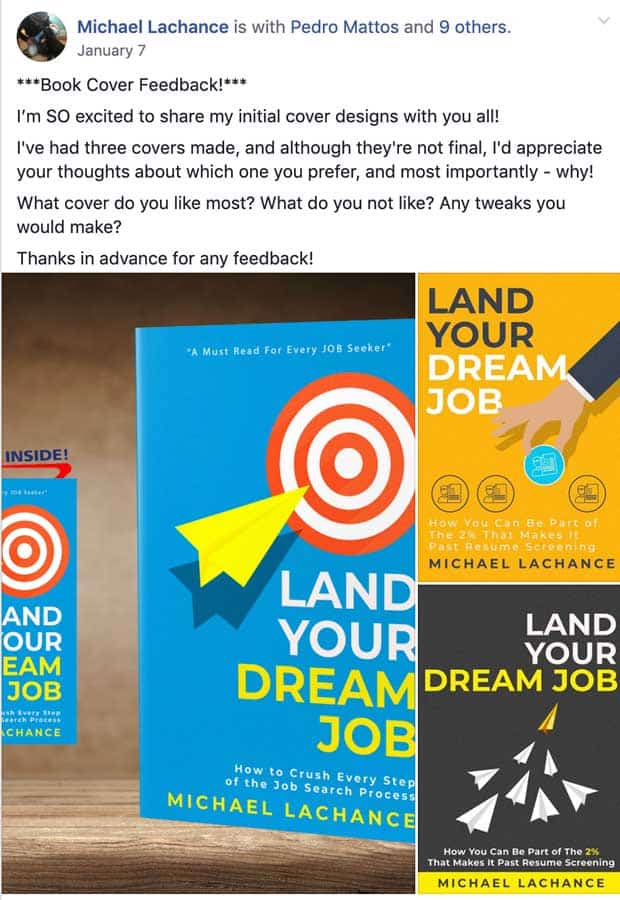
At a minimum, you should have three different cover mockups completed, though we highly recommend three to get a wider range of options.
Below are cover options from our team member, Michael Lachance’s book, Land Your Dream Job. Notice how the covers are different but still fit the book’s theme and genre. Cover design options should vary greatly from one another, and not just be different in their text or colors. Many designers offer three to four cover options within their packages.
Step 6 – Test your book cover options with an audience
It’s always a good idea to run the final cover options through a feedback group to see what OTHER people resonate with.
Sometimes your target market will like a book cover that isn’t your favorite.
While it’s completely up to you which cover to go with, remember to keep your audience in mind. After all, your book is for them, not for you.
Step 7 – Finalize your book cover design options
The final step for your book cover design is to finalize it! Work with your designer to choose your favorite design, finalize the color and typeface/font options, and that’s it!
Consider a book cover reveal to stir up more anticipation for your novel before your book launch!
Start your book cover design today
If you’re ready to take the next step with your book and have your cover professionally designed, book a call with our team. Whether you need a children’s book cover, a fiction book cover, or a nonfiction book cover, we’re ready to help you on your journey to becoming a best-selling author!
This article has been rewritten from its original version by Bella Rose Emmorey.