













If you’re self-publishing on Amazon KDP, you know how important the right keywords can be. It doesn’t matter whether you’re writing a cozy mystery or a self-help nonfiction – your book’s visibility depends heavily on whether readers can find it.
After helping over 8,000 authors write, market, and self-publish their books over the last decade, we know the power of keywords and more specifically, the lack of power your book will have if you skip out on them.
That’s where BookBeam comes in.
BookBeam is a powerful keyword and niche research tool tailored specifically for KDP authors. In this post, we’ll walk through what BookBeam is, how to use it in 5 steps, and whether it’s worth the investment based on features, pricing, and reviews.
Book Outline Generator
Choose your Fiction or Nonfiction book type below to get your free chapter by chapter outline!
Book Outline Generator
Enter your details below and get your pre-formatted outline in your inbox and start writing today!
CONGRATULATIONS
Thanks for submitting! Check your email for your book outline template.
In the meantime, check out our Book Outline Challenge.
Amazon KDP: A quick overview
Amazon KDP (Kindle Direct Publishing) is Amazon’s self-publishing platform that allows authors to publish and sell their books in digital and print formats directly on Amazon. It’s free to use, gives authors control over pricing and rights, and offers global distribution with royalties up to 70%.
But the visibility is competitive. Which is why many authors seek solutions to getting their book seen once published on the Amazon platform. The more popular publishing on Amazon gets, the harder it will be for your book to even cross readers’ screens.
What is BookBeam?
BookBeam is a browser-based platform designed for Amazon KDP publishers. It offers a bunch of tools for keyword research, niche validation, and competitive analysis. It’s best known for helping authors identify high-traffic, low-competition keywords that can improve book discoverability and sales.
Which is perfect for authors who want to write to market so books can be their full-time income, but also great for ensuring your heart book is published in the right spaces to be seen and purchased.
Here are the main features BookBeam offers:
- Keyword & niche explorer: Discover profitable keywords with estimated search volume, competition scores, and category fit.
- Listing analyzer: Spy on top-performing competitors’ keywords and categories.
- Category hunter: Find the right categories to help your book rank higher.
- Royalty calculator: Forecast your earnings based on page count, pricing, and royalty rate.
Bonus: BookBeam works for both fiction and low/no-content books, making it versatile across genres.
Step 1: Start with keyword research
Once you log into BookBeam, the first place to start is the Keyword Explorer tab. Type in a broad keyword or phrase (e.g., “witchy romance” or “substance abuse recovery” or even “Chatgpt” like in the example below) and let the tool populate results.
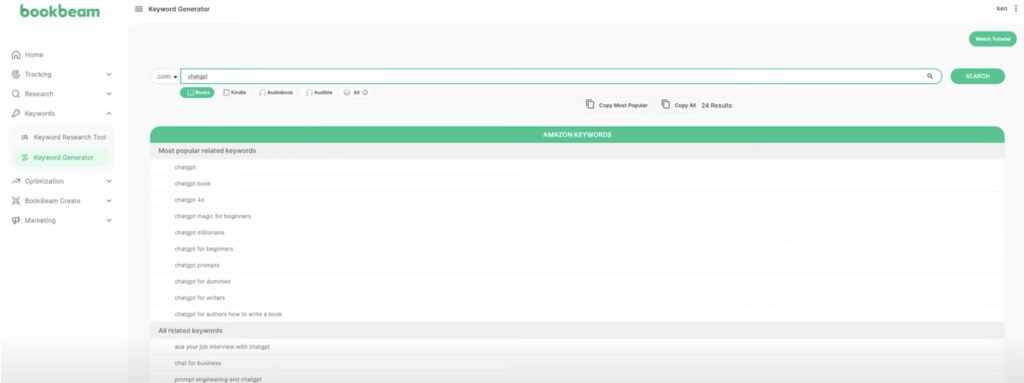
Look for things like:
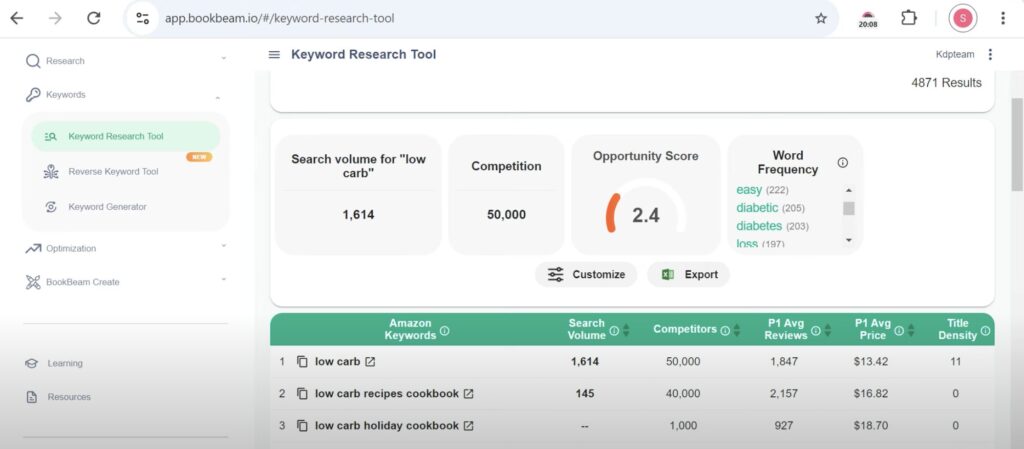
- Search volume (estimated, the higher the better)
- Competition score (the lower the easier to rank)
- Average BSR (best seller rank) of top sellers
- Number of competing books (high volume, low competition, low competing books is a hot space)
Here’s what this looks like:
Step 2: Analyze your competitors
Click on any keyword to pull up the Listing Analyzer, which breaks down the top-performing books ranking for that term. This is where you get insight into:
- Their BSR trends (which books are doing well and continuing to sell)
- Number of reviews
- Pricing strategies
- Keywords they’re using
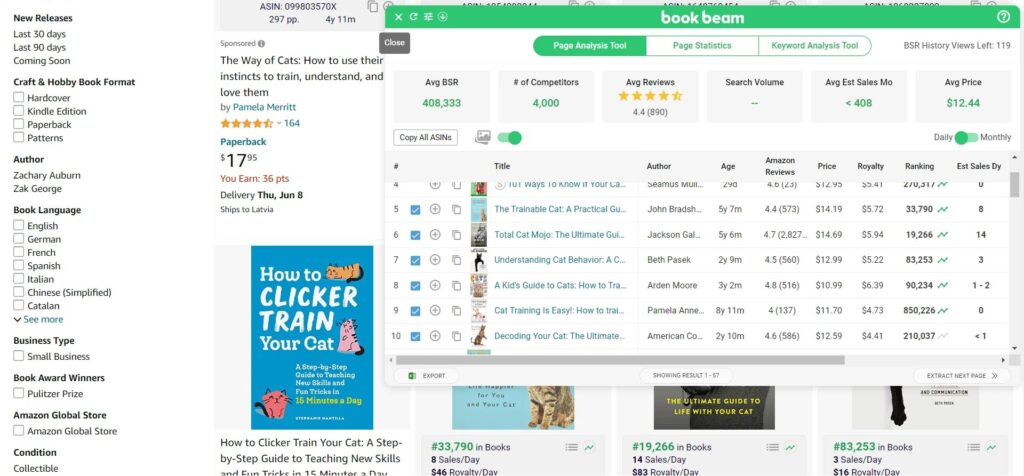
You can use this info to:
- Adjust your pricing
- Refine your subtitle and metadata similar to theirs
- Position your book more strategically in competition with them, because readers want more of what they like!
Step 3: Pick the right categories
Next, head to the Category Hunter. Many self-published authors don’t realize that Amazon allows you to request additional categories—ones that aren’t even visible in the KDP dashboard.
BookBeam helps you find the ones where books with higher BSRs are still ranking in the Top 100.
By targeting low-competition categories, you can increase your chances of getting that orange “#1 New Release” or “#1 Best Seller” badge. This is great for marketing material. Being able to share screenshots of a bestseller banner can entice more people to buy it.

It’s like proof your book is selling. It’s less of a risk for them to get it if it’s a bestseller.
Step 4: Track keywords over time
Once you’ve identified your target keywords and categories, add them to your Keyword Tracker. This lets you monitor how your book ranks over time for those terms and whether your optimization efforts are working.
This is especially useful after launching a new book, running promotions, or changing metadata.
Don’t let your adjustments go to chance. You want real data to optimize for the most sales. Small improvements add up over time but if you never track, you won’t know.
Step 5: Validate with real sales potential
Use the Royalty Calculator to estimate your earnings. This tool factors in trim size, print cost, page count, and royalty rates, helping you price your book competitively while still making a profit.
This is especially useful for nonfiction and low-content publishers where margins can vary.
How much does BookBeam cost?
BookBeam currently offers a subscription plan priced at $29/month or $348/year for their Basic tier There is no free trial, but they offer a 7-day money-back guarantee if you’re not satisfied.
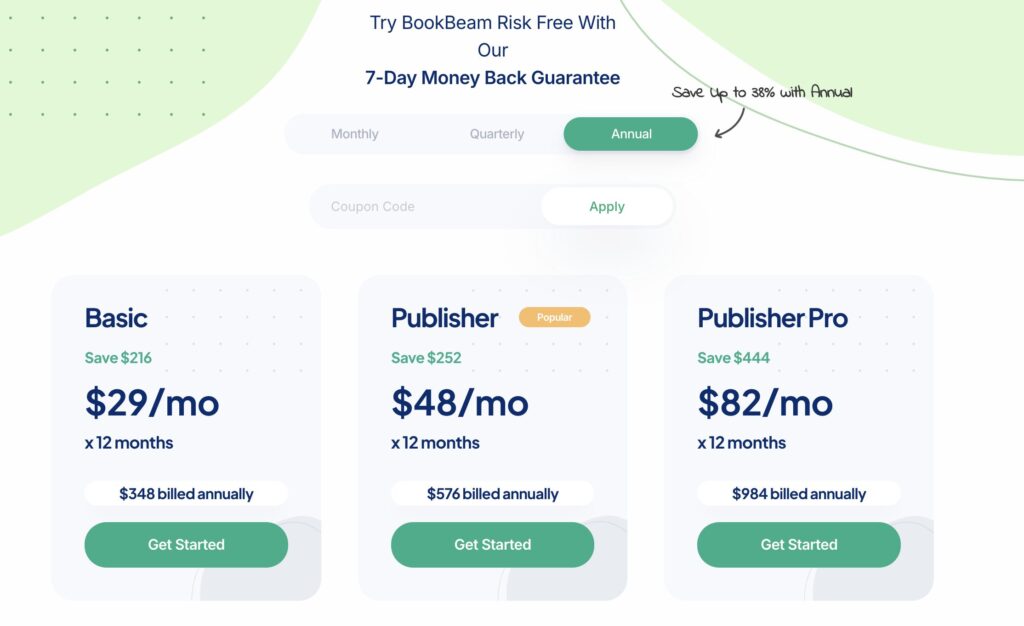
For serious indie authors, this is comparable or cheaper than other keyword tools like Publisher Rocket, KDSpy, or Helium 10.
BookBeam reviews: what other authors say
One of the best places to look for this kind of thing is what users are saying.
Here’s a quick overview of common feedback from users:
Pros:
- Very user-friendly interface
- Accurate keyword difficulty scores
- Unique features like Category Hunter and Listing Analyzer
- Fast customer support
Cons:
- No mobile app
- Doesn’t support international Amazon marketplaces yet
- Lacks some bells and whistles for advanced marketers
Most users agree BookBeam strikes a great balance between simplicity and power, especially for newer KDP authors. Others aren’t quite sure the keyword data is accurate. Overall, many seem to find it worth gaining an understanding for their competitors without as much manual research.
So…is BookBeam worth it?
If you’re struggling to rank your book on Amazon, or you’re launching a new title and want to stack the odds in your favor, BookBeam is absolutely worth exploring. It’s built with self-publishers in mind and takes a lot of the guesswork out of keyword and category strategy.
At the very least, use it before launch to:
- Validate your niche
- Optimize your metadata
- Choose the right categories for ranking
Keep in mind, though, that tools like BookBeam can’t make your book successful. Especially if it’s not very well done. That process is separate from the technicalities of publishing data like keywords and categories.
Book Outline Generator
Choose your Fiction or Nonfiction book type below to get your free chapter by chapter outline!
Book Outline Generator
Enter your details below and get your pre-formatted outline in your inbox and start writing today!
CONGRATULATIONS
Thanks for submitting! Check your email for your book outline template.
In the meantime, check out our Book Outline Challenge.