













Most self-published authors reach a point where their book stops selling on its own. Organic discovery dries up; social media posts stall; friends and family have already bought a copy. You’ve done everything you can without paid visibility, and you realize something important: Readers can’t buy a book they don’t see.
Paid advertising solves that problem, but only when you know how to use it. Too many authors jump into ads with guesswork, spend money without tracking results, or apply outdated advice that doesn’t match today’s marketplace. But if you understand how book ads work, choose the right platforms, and follow a clear strategy, advertising becomes both profitable and predictable.
This guide brings together the full spectrum of what we’ve seen work for thousands of published authors. It consolidates the core strategies from the Amazon Ads platform, the lessons we’ve gathered from coaching authors across every genre, and the tactics the most successful indie authors rely on. You’ll learn where to spend your time, where to avoid wasting money, and how to turn paid ads into a long-term asset for your writing career.
Everything you need to know about book ads
How paid advertising works for authors
Advertising works because it gives you access to readers at the exact moment they’re deciding what to read next. The most successful ads share three characteristics:
- They reach readers who are already looking for something similar to your book
- They generate measurable results you can evaluate and optimize
- They support a larger strategy, such as a launch plan or a full series funnel
Every platform you’ll use operates on these basic principles. Once you understand those mechanics, you stop guessing and start running campaigns with intention.
How platforms decide which ads to show
Every major advertising platform uses an auction system. You and every author targeting the same audience are bidding for the same placement. The system doesn’t reward the biggest spender, but the ad most likely to earn a click and a sale.
Two signals matter most:
- Click-through rate (whether readers respond to your ad)
- Conversion rate (whether readers buy your book once they land on the page)
When someone clicks your ad, the platform evaluates what they do next. If they buy, read through Kindle Unlimited, or take another meaningful action, the platform treats your ad as relevant. If they bounce, the platform logs the mismatch and deprioritizes your ads.
Strong performance earns better placements at lower costs. Two authors can spend the same amount of money and get completely different results.
Your product page decides half of your ad performance
The platform watches what happens after the click. If readers don’t buy your book, Amazon stops showing your ad no matter how accurate your targeting is. When we evaluate underperforming campaigns, the same issues appear repeatedly:
- The cover doesn’t match the genre
- The description isn’t clear or persuasive
- The Look Inside sample loses readers
- The book’s promise doesn’t match the ad targeting
When these elements are aligned, you give the algorithm every reason to keep placing your book in front of new readers. When they’re off, your costs rise and your impressions drop.
What ads teach you about your audience
Ads reveal how readers behave around your book. A campaign tells you:
- Which keywords attract the right readers
- Which authors share your audience
- Which search terms bring clicks but never convert
- Which formats customers prefer
- Which categories actually drive sales
- How readers respond to your cover and blurb
This is real behavioral data, not guesswork, and you can build your entire positioning strategy around the data you collect.
Effective book ads rely on four aligned elements: a motivated reader, accurate targeting, a compelling product page, and a platform that understands how to categorize your book. When these work together, advertising becomes predictable and scalable. When one of them is off, the platform tells you through higher CPCs, fewer impressions, or weak conversion, and then it becomes the author’s job to identify the issue and repair it.
Amazon Ads
Amazon is where your book lives, so it’s where your ads should work the hardest. When you advertise through Amazon Ads, your book can show up in search results, on competitor pages, and in other high-traffic spots inside the Kindle store while readers are already browsing for something to buy.
The system runs on a bid-based auction. Every time a reader loads a page that can show ads, Amazon compares all eligible bids and picks which ads to display, in which order. Your bid matters, but so do your results. Ads that attract clicks and sales tend to win better placements and lower costs over time.
The campaign types that actually matter
You’ll see several options in the Ads Console. For self-published authors, you’ll want to focus on:
- Sponsored Products: Your main campaign type. Shows your book in search results and on product pages. Works with keyword and product (ASIN) targeting.
- Sponsored Brands: Banner-style ads that feature multiple books or your “brand.” Good once you have a small catalog or a series.
- Sponsored Display: Useful later for retargeting shoppers who viewed your book or related books.
Amazon’s own guide for authors centers on Sponsored Products because they’re the most direct and flexible way to promote one or more formats of the same book. For most self-published authors, 80–90% of your early budget should live in Sponsored Products.
How to set up your first Amazon campaign
You don’t need to overcomplicate the setup. A simple campaign that’s well targeted will outperform a complex one you don’t understand.
Follow this basic sequence:
- Go to your KDP dashboard and open the Marketing tab.
- Click “Create an ad campaign” and then “Go to Ads Console.”
- Choose your marketplace (for most authors, this starts with Amazon.com).
- Select Sponsored Products.
- Choose your book and include all formats you want to advertise (ebook, paperback, hardcover).
- Select Manual targeting so you control which keywords and products you bid on.
- Set a daily budget you’re comfortable testing with.
- Add your initial list of keywords and ASINs.
- Write a short, clear ad headline if prompted (where available).
That’s enough to start collecting real data.
Targeting: keywords vs products
Amazon lets you target:
- Keywords (what readers type into the search bar)
- Products / ASINs (specific books and products on Amazon)
- Categories (broad groupings of similar products)
For books, keyword and product targeting are the most important.
Keyword targeting
You choose search terms like “cozy mystery series” or “productivity book for entrepreneurs.” When readers search those phrases, your ad is eligible to appear in the results. You can use broad, phrase, or exact matches, each with different levels of reach and precision.
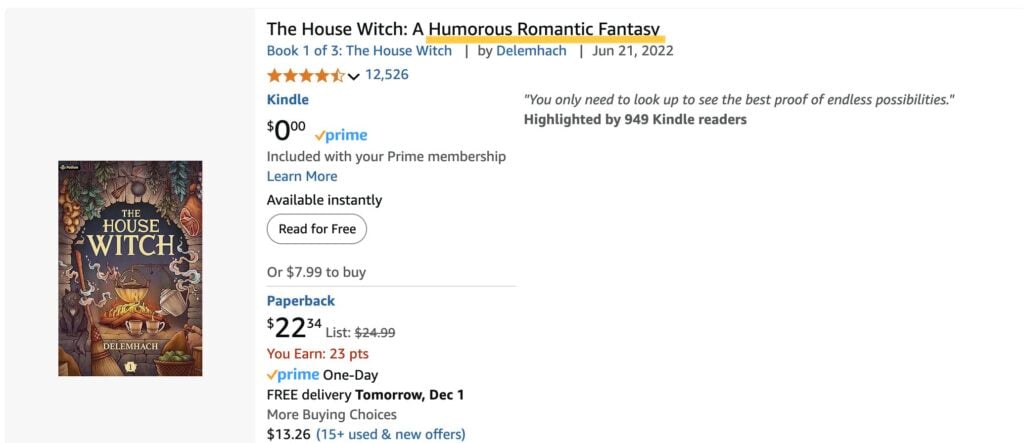
Product (ASIN) targeting
You target specific books that share your audience. Your ad can show on those product pages and sometimes in related placements. Amazon itself recommends focusing product targeting on items with strong ratings when you want more conversions, not just awareness.
A practical setup most of our coaches use with first-time authors is:
- One Sponsored Products campaign for keywords
- One Sponsored Products campaign for ASINs
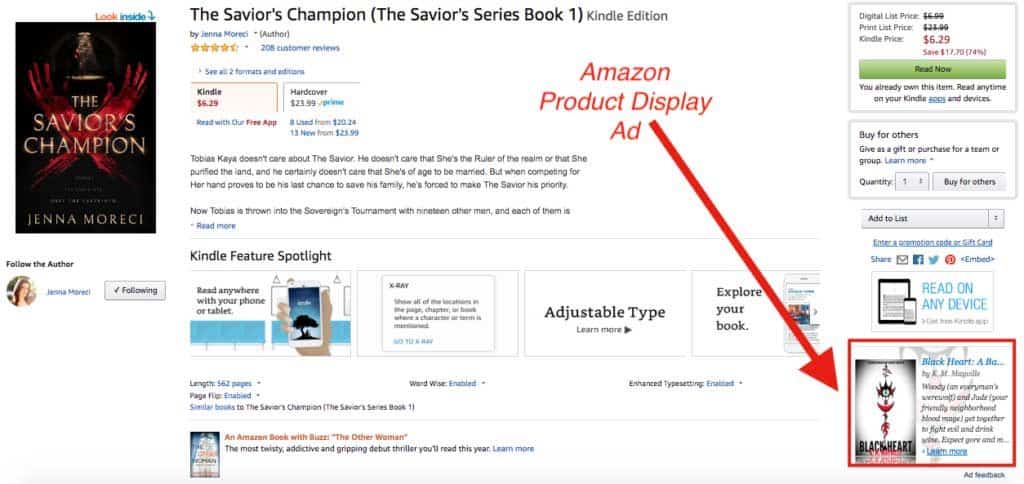
Bids and budgets that line up with profit
In Amazon’s system, you set a maximum cost-per-click (CPC) bid and a daily budget. The platform will never charge more per click than your max bid, and it will stop serving your ads once your daily budget is reached for the day.
To keep this grounded in profit, start by calculating your profit per sale and your target ACoS (Advertising Cost of Sales). ACoS is your ad spend divided by the sales that ad generated.
For example: If you earn $4 in royalty per sale and want an ACoS near 30%, then, in simple terms, you can afford to spend around $1.20 per sale on ads. That number should guide your average CPC. If you’re paying $0.60 per click and your product page converts 1 in 3 visitors, you’re in a healthy zone. If your CPC is close to your profit per sale and your conversion is weak, the math will never work.
As a starting point, pick a daily budget that you’re comfortable losing during the learning phase (more on this later). Set conservative bids, then raise them slowly on targets that prove they can convert.
Use negative targeting to avoid wasted spend
Negative targeting blocks your ad from showing on searches or pages that don’t convert. This is one of the strongest controls you have.
You can:
- Add negative keywords so your ad doesn’t show for irrelevant searches (for example, “free,” unrelated genres, or audiences you don’t serve).
- Include negative keywords inside ASIN targeting ad groups, which is a newer feature and very useful when product campaigns start attracting the wrong traffic.
When you see a search term that brings clicks but no sales over time, make it a negative. That one habit saves our authors a meaningful chunk of their monthly budget.
Simple weekly optimization routine
Platforms like Amazon need a bit of runway to learn. If you adjust your campaigns every day, you keep resetting that learning.
A straightforward, once-a-week routine:
- Sort your keywords and ASINs by clicks.
- For targets with plenty of clicks and no sales, lower the bid or pause them.
- For targets that are earning sales at an ACoS you’re happy with, raise the bid slightly to gain more impressions.
- Look for search terms that keep appearing and performing well, then move them into their own, tightly focused campaign.
- Add a small batch of new, carefully chosen keywords or ASINs each week so your targeting doesn’t go stale.
Even this small level of structure lets ads compound over time instead of feeling like a slot machine.
Meta ads (Facebook and Instagram)
Meta ads can sell books, but they don’t behave like Amazon ads. Amazon reaches people who are already shopping; Meta reaches people who are scrolling. That single difference changes how your ads look, how your funnel works, and how you measure profitability.
Most authors who struggle with Meta ads make the same mistake: they treat it like Amazon. They run a single ad to a cold audience, send people straight to Amazon, and then wonder why nothing converts.
What Meta is good at
Meta excels at:
- Audience discovery when you don’t know exactly who your readers are yet
- Genre and trope testing for fiction
- List building for nonfiction and fiction series
- Boosting a series when books 2–5 do most of the revenue
- Retargeting warm audiences who already know your work
It’s weakest at cold direct-to-Amazon selling, because Meta can’t track Amazon conversions. You lose visibility into what readers do after they click.
On Amazon, all your traffic is “warm” by default because readers are shopping. On Meta, most people are cold. You need to warm them up before asking them to buy. Cold traffic rarely converts directly to Amazon sales; warm and hot audiences convert at a much higher rate.
The Meta funnel that works for authors
This is the structure our coaches recommend for Meta ads, and the one we see succeed most often:
Step 1: Use cold ads to attract attention
Formats that work:
- Short videos
- Carousel ads
- Single-image ads with strong trope-forward copy
Your goal at this stage isn’t to sell. It’s to qualify.
Step 2: Retarget people who interacted with your ad or page
Retargeting audiences usually include:
- Ad engagers (30 days)
- Page engagers (30–60 days)
- Website visitors (via the Meta pixel)
- Email list uploads
Retargeting is where sales usually happen.
Step 3: Send warm traffic to Amazon or your landing page
If you have a landing page for your series or a free lead magnet, send traffic there first. If your only call to action is “Buy on Amazon,” then send warm traffic straight to the store page.
How to target readers on Meta without burning your budget
Fiction targeting works best when it’s trope-specific, not genre-wide. For example, instead of “fantasy fans,” use interests like:
- “progression fantasy”
- “urban fantasy series”
- “post-apocalyptic fiction”
For romance:
- “grumpy x sunshine”
- “rom-com books”
- “enemies to lovers”
And so on.
Meta’s interest categories shift constantly, but you can almost always find trope-adjacent interests or broader umbrella categories like “Kindle Store,” “Amazon Kindle,” or major authors in your niche.
For nonfiction, the targeting should align with the problem your book solves. For example:
- Productivity → “time management,” “entrepreneurship,” “cal newport”
- Personal finance → “financial independence,” “budgeting,” “ramit sethi”
- Health → “habit formation,” “nutrition,” “strength training”
Always keep targeting tight at first. You can widen as you scale.
Ad creative that works for books
On Amazon, shoppers already know they want a book. On Meta, you need to earn the click.
Strong fiction creatives usually include:
- A clean image of the book cover
- A readable tagline that signals genre and trope
- A short 5–12 word hook
- A caption that reinforces stakes or tension
Strong nonfiction creatives often use:
- A promise (grounded, never hype)
- A single, specific transformation
- A “before/after” framing
- A short visual quote from the book
Avoid long text blocks. The ad’s job is to get the click, not to teach.
How to test efficiently without wasting hundreds of dollars
The simplest testing structure is also the most effective:
- One campaign
- One ad set
- 3–5 ads
You’re testing creative, not audiences, at first. Meta is built to find the best-performing ad if you give it options. Let the test run for 3–5 days at a steady daily budget. Then look for patterns:
- Which ad gets the most outbound clicks
- Which ad has the lowest CPC
- Which ad collects the most add-to-carts or landing page views (if tracking)
Keep the winner and turn off the others. Add one new creative to replace the losers.
When Meta won’t work (and why authors often quit too early)
Meta ads usually underperform when:
- You have only one book and no series
- Your cover doesn’t match your genre
- Your targeting is too broad
- You send cold traffic to Amazon
- Your landing page is slow or confusing
- You’re testing one ad at a time instead of multiple variations
Think of Meta as a multiplier that amplifies what already works. If your cover or product page doesn’t convert, Meta will expose it immediately. It’s best to start with just Amazon Ads, learn from there, and then only start with Meta once you’ve been consistently profitable on Amazon for at least a few months.
BookBub ads and Featured Deals
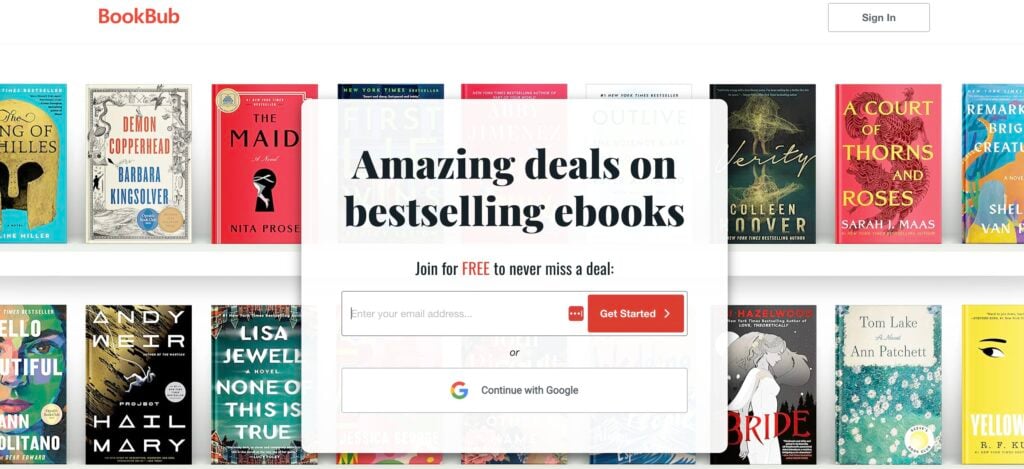
BookBub is one of the few platforms where the audience arrives already looking for their next book. These readers trust curated deals, buy quickly, and respond strongly when your book matches what they expect. That sensitivity makes BookBub powerful for authors who position their book well.
Why BookBub behaves differently
Readers on BookBub aren’t browsing casually. They’re comparing covers, tropes, and prices side by side. If you hit the right combination, the platform gives you fast, concentrated bursts of traffic. Unlike on Amazon or Meta, BookBub users already know what they want. That difference changes everything about how you build campaigns here.
When BookBub is a good fit
We see the strongest results from authors who already have a structure behind their book. Series authors, in particular, get a multiplier effect because a discounted Book 1 turns into full-price read-throughs.
BookBub works well when:
- You can discount Book 1 in a series
- You write in a large genre with clear expectations
- You have strong read-through or KU performance
- You’re preparing for a major promo and want momentum going in
On the other hand, BookBub is weaker for single-book authors, books with unclear positioning, or categories with tiny audiences. The platform can boost a book, but won’t rescue one that doesn’t align with its market.
Featured Deals
A BookBub Featured Deal is the closest thing to guaranteed exposure in digital publishing. When you land one, your traffic surges for one to three days, and your visibility on Amazon often climbs for weeks afterward. But getting approved is difficult: You submit an application, the BookBub editorial team reviews it, and most authors are rejected.
They look for:
- A strong, genre-accurate cover
- Solid reviews
- A discount that makes sense for your category
- A book with enough audience to justify the slot
Even well-positioned books get turned down. The best approach is to apply on a schedule and treat acceptance as an amplification tool, not the core of your marketing plan.
BookBub Ads
Under Featured Deals sits the BookBub Ads platform. This is where you create your own ads, pick a target audience, and choose your bid. It’s straightforward, but unforgiving when your input is wrong.
The biggest difference between BookBub and Amazon Ads is targeting. BookBub is built around author targeting, not keywords. Your ad performs based on how well you select the authors whose readers want your exact set of tropes.
A few examples:
- Cozy mystery: Amanda Flower or Joanne Fluke
- Progression fantasy: Will Wight, Andrew Rowe, and Dakota Krout
- Rom-com: Emily Henry or Christina Lauren
Creative that works on BookBub
Readers scroll quickly and make decisions fast, and BookBub creative should match that behavior. The best ads use simple visual cues and one clear promise. They don’t try to explain the entire book.
Strong creative usually includes:
- The cover as the focal point
- A clear price anchor (“Free today” or “99c limited time”)
- A short hook written in familiar, genre-specific language
What fails most often is overthinking. If your genre relies on specific tropes, your ad should too. If your audience expects clean, bright romance covers, an experimental minimalist design will underperform no matter how clever it is.
The role price plays
BookBub readers expect deals. That expectation has been trained for more than a decade, and it’s reflected in the numbers you’ll see in your campaigns. Free performs best. Ninety-nine cents does well. Anything above $1.99 loses momentum unless you already have a large audience or unusually strong social proof.
This is why BookBub has so much power for series authors. A discounted Book 1 is the funnel. The rest of the series is the revenue. Once you understand your read-through, BookBub becomes more predictable rather than more risky.
Managing bids without overspending
Because BookBub Ads run on CPM bidding, you pay for visibility whether the reader clicks or not. That structure rewards slow, consistent testing. The biggest mistake authors make is changing too many variables at once.
A stable starting point looks like this:
- One creative
- One author target list
- A bid near the bottom of BookBub’s suggested range
- A short test window (two or three days)
Evaluate your click-through rate before you scale. Strong ads often land between two and five percent. Low CTR usually means your creative or audience is off, not that your bid is too low.
How much authors should realistically spend on ads
Advertising only becomes stressful when you don’t know what’s normal. Most authors overspend not because ads are inherently expensive, but because they have no baseline for what a healthy ad budget looks like. Others underspend and assume ads “don’t work,” when the truth is that their campaigns never ran long enough to stabilize. A realistic budget removes that anxiety. When you know what each stage costs, you can make smart decisions and avoid guesswork.
What a realistic entry ads budget looks like
Across thousands of our authors, the cleanest data points fall into the same range for the initial testing stage:
- Amazon Ads: $5–$20 per day
- Meta Ads: $5–$10 per day
- BookBub Ads: $5–$15 per day
These numbers are what we’ve seen after teaching over 8,000 authors how to run ads for their books. They’re what give you enough impressions to generate real signals without overspending. You can scale up later, once your cost-per-click and conversion rate stabilize. Be prepared to spend 2-4 weeks on this initial testing and iterating phase for each campaign, until you find one that works.
How to fix common book ad problems
Every struggling ad campaign leaves a trail of clues. The problem is never as vague as “the ads aren’t working.” The problem is that something specific inside the system is misaligned, and the ads are revealing that misalignment. Below are the most common symptoms authors encounter, the causes behind them, and the steps to fix each one.
Symptom 1: You’re getting impressions but almost no clicks
This usually means your ad is being shown to readers, but those readers don’t feel like your book is for them.
Common causes:
- Your cover doesn’t match the genre
- Your hook or headline lacks specificity
- Your audience targeting is too broad
- Your ad isn’t visually strong enough to stand out
How to fix it:
- Start with the cover. If your cover isn’t aligned with the top sellers in your category, no amount of ad tweaking will fix the problem.
- Sharpen your hook. Replace vague phrases with trope-specific promises.
- Refine your audience. Use author comp targeting (BookBub) or competitor keywords (Amazon) instead of broad categories.
- Test variation, not volume. One improved creative outperforms ten identical ones.
Symptom 2: You’re getting clicks but no sales
This is the clearest sign that your product page is the problem. Amazon Ads can deliver traffic, but they can’t convince readers to buy. If the page doesn’t convert, the ad platform eventually suppresses your placements.
Common causes:
- Cover mismatch
- Blurb mismatch
- Low review count or poor review quality
- Weak Look Inside sample
- Metadata or categories misaligned
How to fix it:
- Update your blurb to speak directly to the expectations of your best keywords.
- Redesign your cover if competitor comparison exposes a mismatch.
- Clean up your Look Inside sample; the first 10–15% should feel polished.
- Update categories and keywords to reflect where your book actually converts.
Symptom 3: Your CPC keeps rising
Platforms reward ads that earn money. If competitors convert better or receive stronger engagement, you’ll pay more to stay in those auctions. This usually comes from one of three sources:
- You’re bidding on high-competition keywords
- Your click-through rate is low
- Your book is underperforming compared to competitors
How to fix it:
- Move your targeting toward long-tail, high-intent keywords
- Improve your creative to raise CTR
- Strengthen your product page so you win more auctions organically
Symptom 4: Your ads used to work, but performance suddenly tanked
A sudden drop is almost always caused by a change, either in your system or the marketplace. Common triggers:
- You changed your cover or blurb
- A competitor launched with stronger assets
- Seasonal shifts in demand
- You scaled too fast before the campaign was stable
- Amazon recrawled your metadata and reclassified your book
How to fix it:
- Compare your page to top-ranking books in your categories
- Pull your Amazon search term report and identify where impressions dropped
- Rebuild a fresh auto campaign and see where Amazon places you now
- Roll back budgets and bids to learning-mode levels and stabilize
Symptom 5: You get strong clicks on BookBub, but no meaningful sales
BookBub is one of the best platforms for revealing early positioning issues because the audience is highly trained and brutally honest. Common causes:
- The cover feels “almost” right but not quite
- The hook doesn’t match the author targets you selected
- Your price doesn’t match reader expectations
- Comp authors you chose don’t actually share your readership
How to fix it:
- Rebuild your author target list using only direct comp titles
- Refresh your creative with a more trope-forward hook
- If possible, align your price with BookBub’s strongest ranges (Free, 99c, $1.99)
Symptom 6: Facebook/Instagram ads deliver clicks, but the traffic is low quality
Meta excels at awareness but struggles to produce high-intent traffic unless your creative does very specific work. Common causes:
- The hook is too broad
- The ad promises something the book doesn’t deliver
- Your imagery draws attention but attracts the wrong audience
- Your targeting is over-filtered or under-filtered
How to fix it:
- Rewrite the hook so it speaks directly to a specific type of reader
- Use your cover as the anchor visual instead of abstract graphics
- Test broader targeting and let Meta’s learning system refine the audience
Symptom 7: Your ads are profitable, but you can’t scale
This is a good problem, and it usually means one of two things:
- Your most profitable keywords or audiences are very narrow
- Your product page conversion rate is strong but not strong enough to sustain bigger spend
How to fix it:
- Broaden your targeting by introducing adjacent comp authors
- Improve your blurb to raise conversion by a few percentage points
- Strengthen your Look Inside sample
- Add a second creative variant to widen the entry points
Symptom 8: You don’t know what the problem is
This is the most common issue for new advertisers. The system feels chaotic because you’re looking at symptoms instead of the full cause-and-effect chain.
There’s a simple hierarchy that reveals what’s broken:
- No impressions → Targeting or bidding issue
- Impressions but no clicks → Creative or cover mismatch
- Clicks but no sales → Product page issue
- Sales but no profit → Budget or series economics issue
- Profit but no scale → Audience depth issue
It’s likely to feel overwhelming at first. And that’s okay! Stay consistent, follow a proven framework, and keep iterating until you find a campaign that clicks. You only need one successful campaign to make all your testing worth it. Keep at it, and it’s inevitable that you’ll get there eventually as long as you have a system to follow.
Looking for help marketing your book?
Running profitable book ads isn’t guesswork when you’re working with people who have done it thousands of times across every major genre and budget level. You don’t need to become an ads strategist to succeed; you only need guidance from someone who already knows the pitfalls, patterns, and shortcuts.
If you want to stop wasting money on ads that don’t convert, schedule a free strategy call with our team and get a real diagnosis for your specific book, genre, and goals.