






Self-publishing on Amazon is a large contributor to the platform being the number one retailer for books worldwide. I’ve written a lot of books, so I know the ins and outs of Amazon’s KDP platform.
I also know how it feels to question what next step to take or wonder if you’ll succeed. But years ago, I chose to self-publish on Amazon. It was one of the best decisions I ever made.
Why? I didn’t need to go through the painstaking efforts to land a book deal, which locks writers into unrealistic deadlines and cuts them out of most of their well-deserved earnings.
Self-publishing allows writers to have complete creative control of their book (and their revenue) by self-publishing. For the last decade we’ve helped over 8,000 students (and counting) fulfill their dreams of becoming published authors on Amazon KDP.
We help people just like you publish their books every single day. Now we want to share what we’ve learned with you.
If you find yourself overwhelmed with the process while reading, you can simply book a call with our team. We’re always happy to walk you through each step of the self-publishing journey.
Book Outline Generator
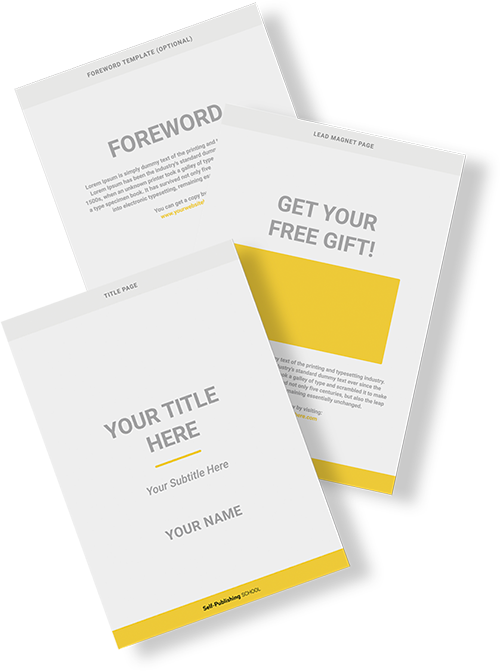
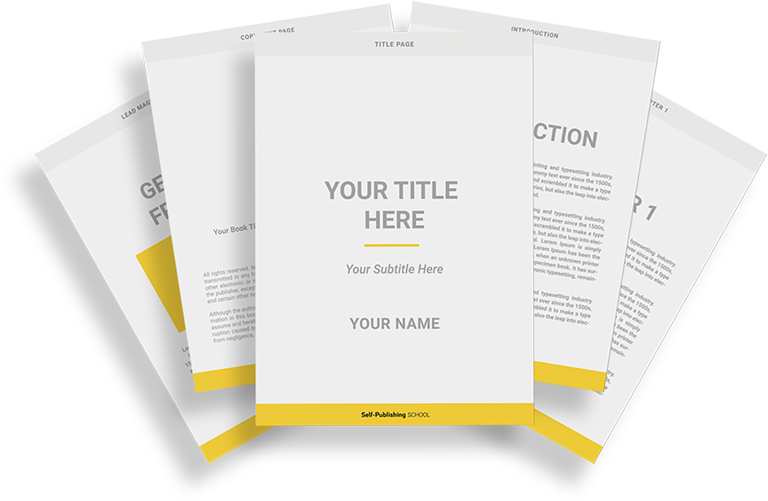
Choose your Fiction or Nonfiction book type below to get your free chapter by chapter outline!
Book Outline Generator
Enter your details below and get your pre-formatted outline in your inbox and start writing today!
CONGRATULATIONS
Thanks for submitting! Check your email for your book outline template.
In the meantime, check out our Book Outline Challenge.
Self-publishing on Amazon: what you learn:
- How much does it cost to publish a book at Amazon?
- Is it profitable to self-publish on Amazon?
- How to self-publish on Amazon?
- Self-publishing on Amazon: FAQs
How much does it cost to publish a book on Amazon?
Nothing! It’s free to use the platform for self-publishing on Amazon. You pay no upfront costs, but Amazon will take a portion of your book’s earnings to print, leaving you with 60% royalties after the book print price, which is why authors are making more now than ever before.
You do not need to spend anything to achieve your dream of becoming an author. All you need is a computer, a WiFi connection, and maybe some help walking through the steps to publication.
I’ve been right where you are, and I’m happy to share my experience with you so you have the guidance you need. Just keep reading to learn how to self-publish your book on Amazon!
Is it profitable to self-publish on Amazon?
Yes, you can bring in a good deal of sales depending on how you price your book and how much time you invest in marketing.
Let’s say you set your book’s price to $17.99 on Amazon, there will be a $.85 printing fee for 100 pages, plus $.012 for each additional page. You will make 60% of the list price, and the printing fee will be subtracted from that to give you your total amount of earnings:
$17.99 x .60 = $10.79 royalties per book
Subtract the printing cost from your royalty rate to get our take-home pay (based on a 300-page book):
$10.79 – $3.25 = $7.54 take-home per book
So while you don’t pay anything to publish through Amazon, they do still charge for the book’s printing costs.
By now you must be thinking that self-publishing on Amazon is a good deal, so let’s take you through a step-by-step guide to publish your book successfully using KDP.
How to self-publish on Amazon?
You can self-publish by setting up an account and uploading your book. It’s so easy that anyone can try self-publishing on Amazon, but that doesn’t mean the book will actually sell.
You have to know the specifics, from setting up your KDP account to the pricing of your Kindle eBook. If done correctly, you can expect a successful launch, and with multiple books published this way, you may even make a living writing books.
Here are our steps for successful self-publishing on Amazon.
1. Create an account on KDP
Before you can get started with self-publishing on Amazon, you first have to have an account set up with them.
Here’s how to set up your Kindle Direct Publishing account:
- Go to https://kdp.amazon.com and register with your Amazon account or your email address.
- Next, click “Update” in your account information and fill in your tax information. You need to complete your tax information BEFORE you can publish your first book. So don’t skip this step!
- Once your tax information is complete, click “Finished” and return to the main page.
- Your profile is complete!
With your KDP account setup, proceed to
2. Choose a book title and subtitle
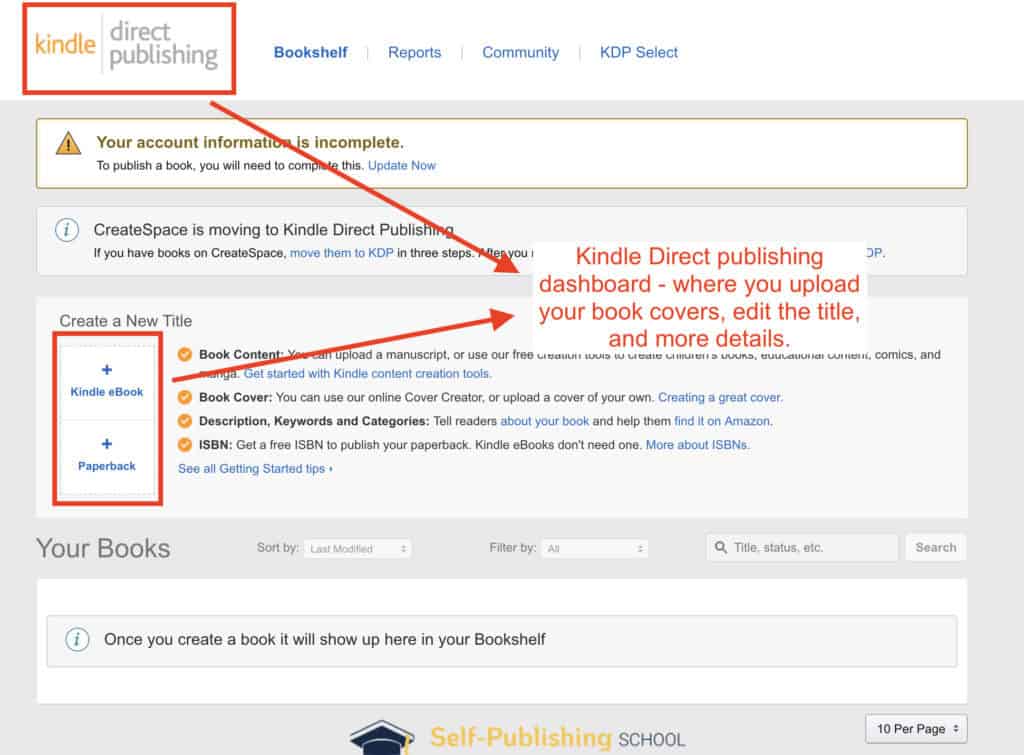
In your KDP profile, you need to fill in the title and subtitle of your book.
Here are a couple of tips for crafting a great book title:
- Use a book hook: Your book hook should speak to the reader in a unique voice that grabs their attention and feeds into what they are looking for.
- List the benefits: Your potential readers want to know what they will get from reading your book. One technique is to deliver the benefits in the subtitle, providing enough tantalizing information to further attract readers.
Think about what you would be attracted to in a book title for the particular genre you’re writing in.
Keep it simple, clear, and unique. Research the title you want to use and make sure it hasn’t been scooped up by a high-performing book already. You don’t want to make competition for yourself.
3. Write your book description for Amazon
You need a powerful book description in order for potential buyers to want to read. Even though the cover and subtitle should do a great job, we all want more information when it comes to putting money toward something.
Here’s what people notice first when seeing a new book:
- Title
- Cover
- Book description
A book description is a short written narrative that illustrates what your book is about. It should be written like a sales page to capture the interest of your reader.
This is crucial because the description, in many cases, is the final factor that determines whether the reader will read your book or not. That, and great Amazon reviews.
When done correctly, a well-written book description can practically sell a book on its own.
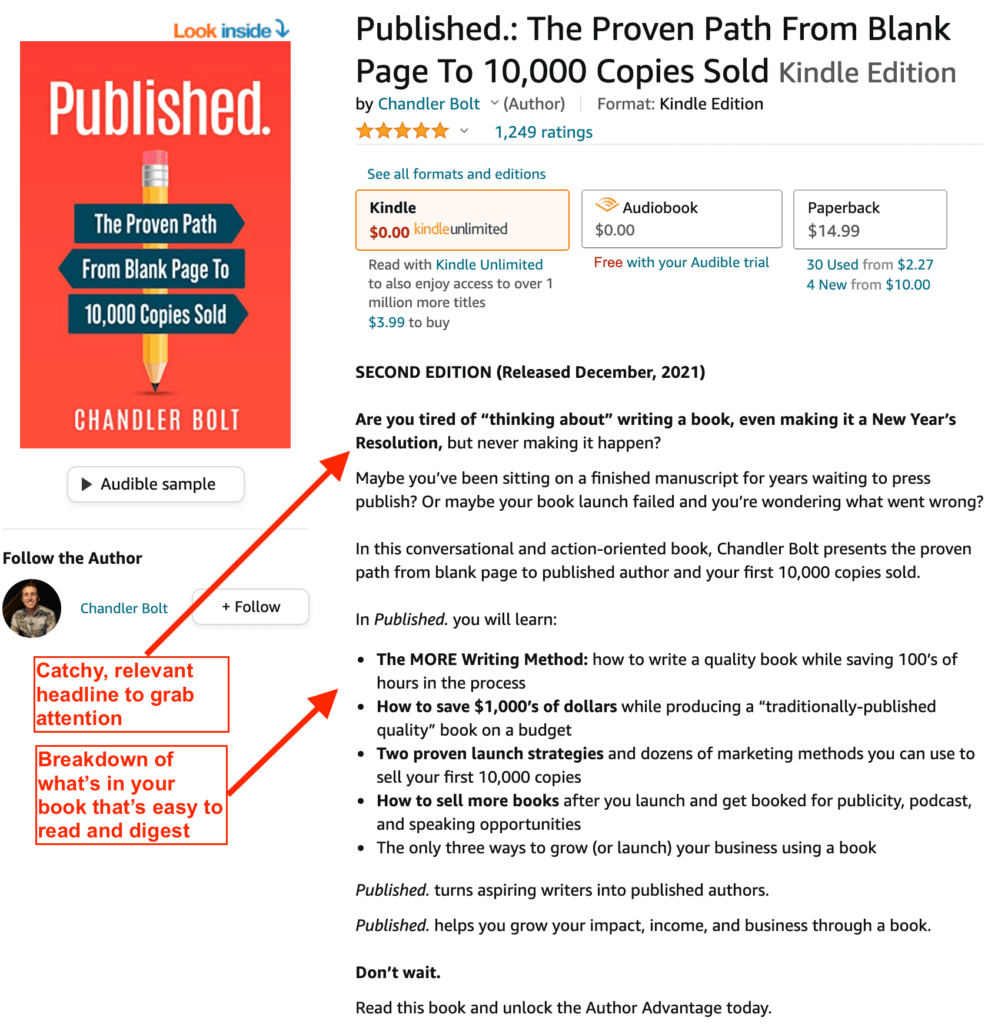
Here are some strategies to help craft your perfect description:
- Make your first sentence as enticing as possible
- Write your description like a sales page or advertisement, not a dry summary of your book
- Have the description feel personal and empathetic
- Detail the benefits your reader will gain by reading your book
Here’s a great example of a full book description on Amazon:
You can find more amazing description examples with these books:
- Champion Mindset: Tactics to Maximize Potential, Execute Effectively, & Perform at Your Peak – Knockout Mediocrity! By Patrick King
- Novice to Expert: 6 Steps to Learn Anything, Increase Your Knowledge, and Master New Skills by S.J. Scott
Spend some time crafting your eye-catching book description for self-publishing on Amazon. It will make your book stand out to your readers and motivate them to purchase your book.
This is also a great video about how to write an Amazon book description to get sales:
4. Choose your Amazon keywords
If you want your book to show up in Amazon and Google search engines, you’ll need the right mix of keywords. Since self-publishing on Amazon only allows seven keywords per book, keyword selection requires strategy.
Keywords are specific words or phrases used to describe your book. If someone was looking for a book on your topic, they might type one of those keywords into Amazon or Google to find it.
Self-publishing on Amazon is all about becoming relevant in your niche. This not only gets you the type of readers you want, it also helps tremendously to have the correct visibility.
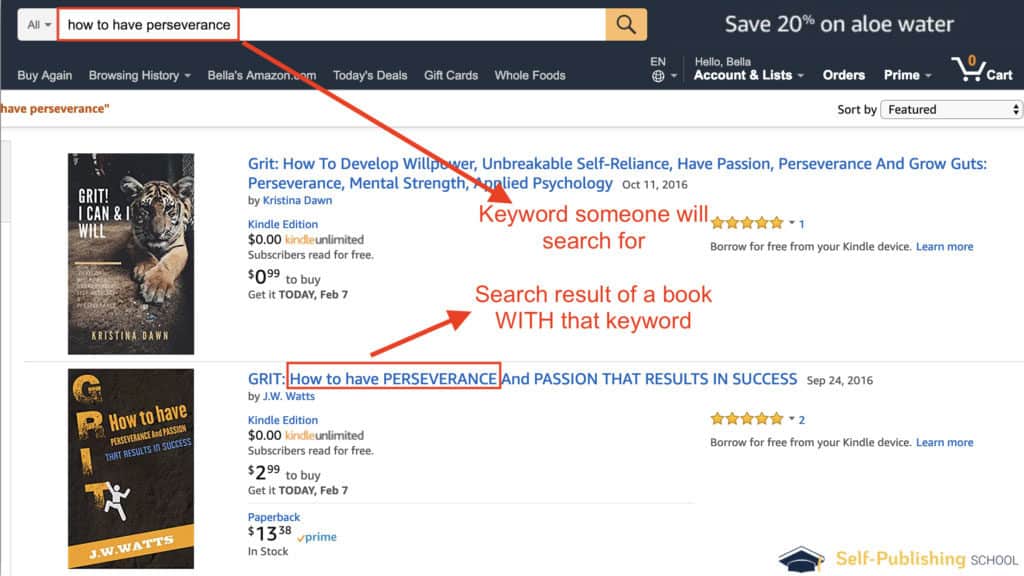
For example, if your book is about perseverance, you might find keywords like this useful:
- How to have perseverance
- What is perseverance
- Perseverance examples
- Persevering
- Persevering when it’s hard
These are all phrases or words people looking to better themselves with perseverance would type into search engines in order to find what they’re looking for, like in the image below.
Amazon Keyword Research Tools
- Publisher Rocket: This is a great tool for comparing Google search results to Amazon. It gives you a competitive score from 1-99, keyword results from both Google and Amazon, and how much money other books are making. You can check out this Publisher Rocket Review.
- KW Finder: This tool gives an analytical view of the keyword popularity using a competitive ranking. You can search for five keywords for free per day.
- Amazon’s Autofill Function: Take advantage of Amazon’s search box to find good keywords. Amazon’s suggestions are based on search history so you want to search for words that are high in demand with little competition.
- Google Search: Google is still the king of search, you can easily check to see if there are authors ranking in search results. You’ll want to understand the best angle even outside of Amazon.
Make a list of possible keywords for your book, then leverage the tools above to test your keywords. Putting in the time to get keywords right will have your book rank higher and appear more frequently to readers. All of these steps are part of how you make it as a writer.
5. Select your Amazon categories
Self-publishing on Amazon provides you with a collection of categories and subcategories to choose from. Like keyword selection, your goal is to look for trending areas that don’t have tons of competition.
If you visit your book page, these categories will appear partway down the page, displaying the rank, like in the image example below.
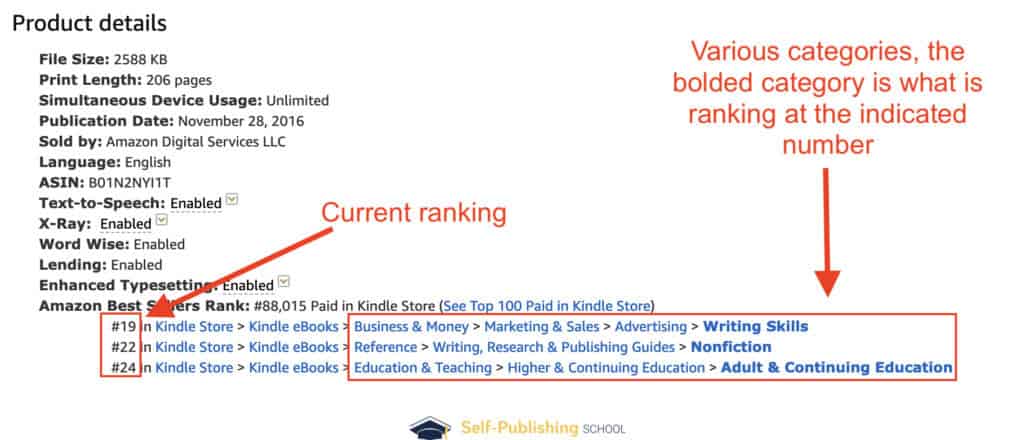
These categories are what you will rank as a bestseller in, which is why you want to make sure you pick fitting categories that are specific, but also not super competitive.
You want to stand out. That’s a large part of how to succeed in self-publishing on Amazon. That said, these do have to match the intent of the book you wrote.
Amazon’s sales ranking measures how well a product is selling compared to its competitors. All books that are ranked 2,000 or less are considered to be highly purchased products in that particular category.
Here are a few tips to rank in more categories when publishing on Amazon:
- Research your competitors’ keywords
- Choose trending categories with lower competition
- Acquire additional categories by contacting Amazon and asking for keyword placement
Unless you have an established author platform with significant downloads and reviews, try to aim for categories with books that rank between 10,000-30,000.
Do you want to know how to rank for ten categories? Check out our blog post that details how to get approved for more categories on Amazon.
Book Outline Generator
Choose your Fiction or Nonfiction book type below to get your free chapter by chapter outline!
Book Outline Generator
Enter your details below and get your pre-formatted outline in your inbox and start writing today!
CONGRATULATIONS
Thanks for submitting! Check your email for your book outline template.
In the meantime, check out our Book Outline Challenge.
6. Upload your manuscript to Amazon
In order to succeed at self-publishing on Amazon, you have to make sure your manuscript is in the right format to be uploaded. Usually, your formatter will do this for you, but if you’re not sure or have self-formatted your book, these are Amazon’s recommended formats for uploading your manuscript:
- Recommended Amazon Publishing Formats:
- Supported Formats:
Here’s how to upload your book to Amazon:
- In your Kindle Direct Publishing account, go to “Your Bookshelf”
- Locate and click on “Kindle eBook Actions” next to the title of your book
- Locate and click on “Edit eBook Content”
- Click on “Upload eBook manuscript”
- Upload your manuscript file on your computer
- Upload complete!
Once Amazon finishes uploading your file, a confirmation message will be sent and you can preview the uploaded file to check for any errors. You can upload the manuscript as many times as you want and the new version will override the existing one.
7. Create your book cover
When it comes to publishing a successful book on Amazon, having an attractive book cover design is one of the most important aspects to get right. Contrary to what we were told growing up, people do, in fact, judge a book by its cover.
It’s actually one of the biggest deterrents. Your cover is exactly how your book will be judged at first glance.
You can find cover creators on freelancing sites such as:
Prices will depend on the level of service, but these sites will give you plenty of amazing graphic designers to choose from! It’s a great investment that will make your book stand out perfectly on the Amazon self-publishing platform.
Depending on what program they’re in, our students can have the cover designed for them or receive a list of qualified, trusted book cover designers they can work with directly in order to get a worthy cover.
Make sure to do your research regarding what type of book cover does best in your genre. If you write fantasy books, for example, it will be a lot different than writing a memoir or even historical fiction.
8. Price your book
A question often asked is, “How should I price my book?” This is up to the author, but generally, I’ve found the best range to have your book priced at when self-publishing on Amazon is between $2.99 to $9.99.
The royalty payments vary depending on the country, but you can learn more on KDP Select pricing page. One popular strategy for beginners is to price your book at $2.99 and gradually increase it by $1 per week.
At some point, your sales will begin to dip. And while that’s normally a negative statistic, in this case, it confidently tells you the perfect price of your book that guarantees a profit.
Here are the 4 main pricing strategies to consider in order to be competitive and sell books when self-publishing on Amazon:
- Know the price of your competitors. Compare the list price of your book to the books around you and determine if you would be able to sell your book for a higher price.
- Know the size of your followers. Famous authors can charge a lot for their books because they have a big following. Your book should be priced lower to encourage new readers to buy your work if you’re not in this category.
- Determine price based on the size of your book. Size does matter when it comes to books. Don’t charge $20 for a 75-page book. Customers will immediately be turned off by the lack of content at that price point.
- Measure price based on reviews. Reviews carry a big weight on influence, and are social proof that your book has been read and well received. Therefore, a book with more reviews (1000+ reviews) can be priced higher compared to a book with fewer reviews (30+ reviews).
You can get legitimate and honest book reviews from:
- Your personal launch team
- Fans of your social media page
- Personal email list
- Adding a note to leave a review in your book
Self-publishing on Amazon allows you to adjust your price points as you bring in more reviews.
Self-publishing on Amazon: FAQs
Let’s take a look at some FAQs so you feel ready to start self-publishing on Amazon.
Should I traditionally publish my book?
Traditional publishing is on the way out. This has been the reality for some time (and for good reason).
While traditional publishing had its time and was once the only option for publishing a book, the new system of self-publishing levels the playing field. When done right, self-published authors can make more money, retain all their rights, and leverage their books in more ways than ever before.
Though traditional publishing is still a viable option for some, self-publishing on Amazon is the best option, and here’s why:
- Over 70% of books are sold on Amazon
- There were 310 million book buyers on Amazon last year
- Those buyers accounted for over $178 billion in sales
- Self-publishing on Amazon is easier and faster
There are major differences between self-publishing and traditional publishing, with the majority of authors opting to take their talents to Amazon instead of one of the Big 5 publishing houses.
(Pssst! Want to see some of our students’ self-published books? Check out the SPS library here!)
Who is the 30 year old who makes $1.8 million self-publishing on Amazon?
While reportedly not his real name, author Alex Rivera, newly 30, has made nearly 2 million dollars self-publishing on Amazon. While this isn’t everyone’s success story, it goes to show you can succeed, massively, self-publishing on Amazon.
How many copies does the average self-published book sell on Amazon?
Sales vary widely, but most self-published books sell fewer than 250 copies in their lifetime. However, with effective marketing and a quality product, some authors achieve much higher sales.
Do I need to copyright my book before self-publishing on Amazon?
While not required, it’s a good idea to register your copyright to protect your work. In the U.S., you can register your copyright through the U.S. Copyright Office.
How many pages does a book have to be for self-publishing on Amazon?
There’s no minimum page requirement for self-publishing on Amazon. However, a standard book typically ranges from 24 to 1000+ pages.
What genre of books sell the most?
Genres like romance, mystery/thriller, and self-help tend to sell well. However, success depends on quality, marketing, and meeting reader expectations within your chosen genre.
Self-publishing on Amazon: take your next step today
Now that you know all about self-publishing on Amazon, it’s time to make your author dream a reality. Take your next step today by using our free resource below!
Book Outline Generator
Choose your Fiction or Nonfiction book type below to get your free chapter by chapter outline!
Book Outline Generator
Enter your details below and get your pre-formatted outline in your inbox and start writing today!
CONGRATULATIONS
Thanks for submitting! Check your email for your book outline template.
In the meantime, check out our Book Outline Challenge.