














Do ebook covers really matter? It’s a mistake to think that they don’t. While a good story boils down to great content, it’s often the cover that piques a reader’s interest and gets them to buy.
While it is true that in the end, it’s the message (or story) between the front and back cover of a book that a reader will likely remember, a cover is like the gift wrap on a present. It doesn’t impact what’s inside, but it can make opening it more exciting.
Ebook cover design can be the key that unlocks the door to more book sales or a stumbling block that keeps you from reaching your potential. Regret is no fun, so prioritizing the design of your eBook cover is a smart move in the beginning.
So, yes, book covers absolutely matter, but how do you make sure that your ebook cover stands out and gets noticed?
Today, there are more choices than ever for creating a polished, professional book cover. Gone are the days when only large publishers had access to the tools to create memorable covers. There are more opportunities than ever for self-publishers to either hire someone to create a knock-your-socks-off cover or create the cover themselves. That’s what we’ll discuss in this article.
We’ll cover:
EBook cover design professionals: Are they worth it?
There are many companies and freelancers who offer cover design services. You can often bundle an ebook cover design with your paperback cover and hardback cover, as well as an interior format, so you have fewer people to hire. Bundling services like this is typically a cheaper option than hiring a cover designer and interior formatter separately.
If you’re only publishing an ebook, your cover design should be fairly affordable to have done, whether you design it yourself or hire out.
While good design skills take a while to cultivate, one of the easier book projects to practice on is the ebook cover. It’s much simpler to design your own ebook cover than it is to design a full wrap (with the spine and back cover), like for a paperback or hardback.
When deciding if you’ll hire out or DIY your cover, here are a few questions to ask yourself:
- How much money do I want to invest in my book?
- How much time do I want to invest?
- Do I want to learn a new skill, even if it takes some time?
- Is my skill set at, or close to, a level where I can accomplish what I’d like to accomplish with the cover of my ebook?
Answering those questions should give you a pretty clear idea of which avenue is best for you and your publishing goals.
When you’re looking to cut costs on book production, cover design is not one we usually recommend. The cover is one of your biggest marketing tools, so if you’re investing money anywhere, the cover design is a great choice.
But that doesn’t mean you shouldn’t ever design your own covers, so we’re going to go over a few ways you can do it yourself, as well as the best practices when it comes to hiring a designer.

How do I make an eBook cover design?
It can take a lot of time to nail the skill of graphic design, but it’s not impossible! Here are some things to consider when designing your own covers.
1. Research your genre
The genre, subgenre, tone, themes, and target demographics should all be reflected in the cover design of your book. That means you need to know what other authors in your genre are doing with their covers! It’s also important to research each one throughout your career, as trends and expectations evolve rapidly in the publishing industry. You can give your book a leg up or a kick down with the cover design, so try to be intentional and thorough with your research and designs.
2. Focus on readable text
Physical books meant to sell in stores have covers designed to stand out in big print on a brick-and-mortar shelf.
For ebooks, your sales will happen online. That means a lot of glimpses at your book cover will be in thumbnail size! Try to design your cover in a way that is the most readable. Avoid too many distracting designs, make sure the text is big and clear enough to be seen in a smaller image, and make it eye-catching.

3. Learn the basics
Look at LOTS of examples from other recent books in your genre. Learn about symmetry, scale, framing, fonts, imagery, and other basic design fundamentals before you jump in.
You can check out one of our articles on the topic, or you might try a class like Wend Fessler’s “Design A Book Cover – Graphic Design Basics” or Jeremy Deighan’s “Canva: Book Cover Design” for a guided experience.
If book learning is more your speed, try Book Cover Design Formula by Anita Nipane.
4. Book design software
The software you choose to use for your cover design will affect the process, timeline, and finished product. You might invest in something a bit more high-end, but you don’t necessarily have to dump a lot of money on software, especially if this is your first book. Here are some common ones you might consider.
Illustrator
Many professional book cover designers use Adobe Illustrator. This may not be the best choice for a beginner because the software is less intuitive than some other cover design software options, but if you already have an Adobe Illustrator subscription or knowledge of the
InDesign
Adobe InDesign is a great software purchase for indie authors because you can use it to format the interior of your books, as well as for your covers. If you’re a do-it-yourself indie author, a program like InDesign that will allow you to handle multiple parts of the publishing process is a great investment, as well as more time-effective, as you only have to learn one program. There are tons of great Adobe InDesign classes on sites like Skillshare or Udemy.
Cost: $20.99 per month
Affinity Designer/Affinity Publisher
Affinity Designer is a professional design software that’s comparable to InDesign. Unlike InDesign, which requires a subscription, Affinity Designer offers a one-time purchase for lifetime access. The company also offers Affinity Publisher, which is similar to InDesign.
Cost: Starts at $69.99 (one-time purchase)
BookBrush
BookBrush is a simple program for creating marketing images, as well as book covers. It’s worth checking out, since most of their features are available for free. This is a good option for less experienced designers, since BookBrush provides intuitive tools and a library of solid templates to get you started.
Cost: $8.99 per month for a premium account, but you can access most of BookBrush’s features for free!
Canva
Like BookBrush, Canva offers most of its features for free, as well as many great templates. Canva is a strong tool for indie authors, even if you aren’t using it to design covers. Take a look at their social and marketing templates if you haven’t yet!
Cost: $15.00 per month for the premium version, but most features are free.
Here’s a quick step-by-step walkthrough of a sample eBook cover I designed in Canva.
1. Sign up for a free or pro Canva account. Both types of accounts can be used for an eBook cover design, but the Pro account offers additional features like background removal and other perks to make designing a cover easier.
2. Log in to Canva
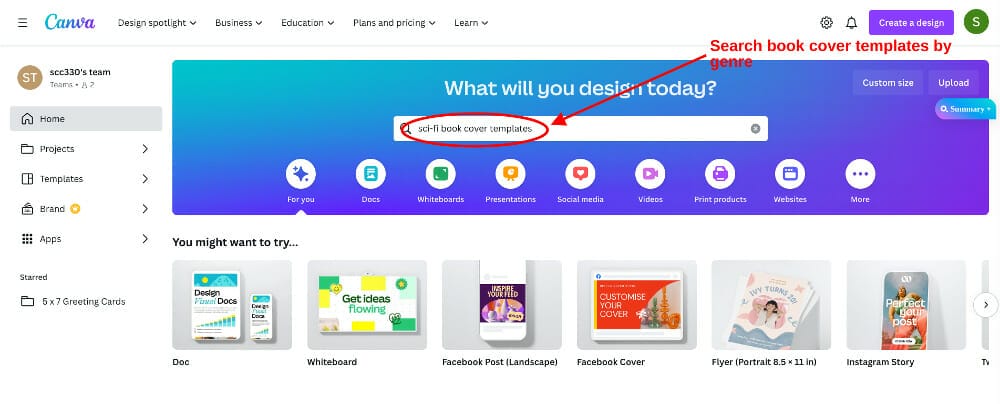
3. Search for templates in your genre. For this example, I searched for “Sci-fi cover templates.”
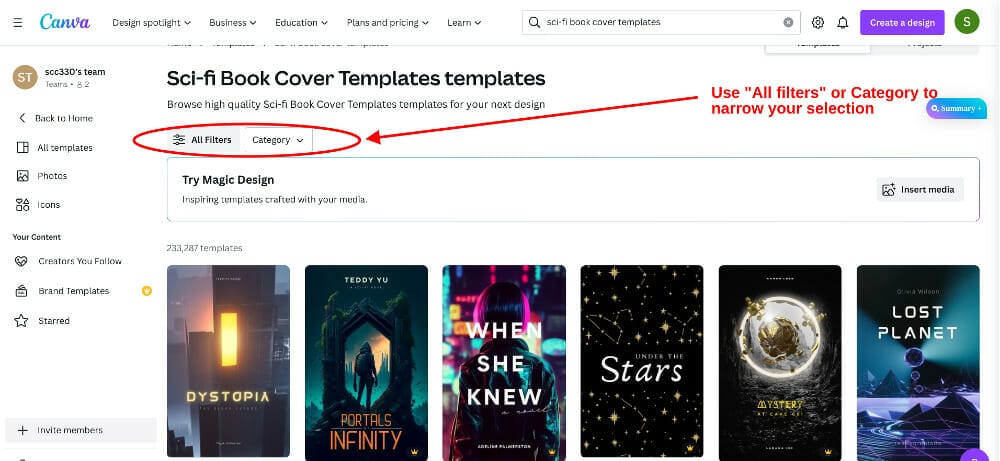
4. Refine your search with the category drop-down list or “All filters.”
5. Choose a template
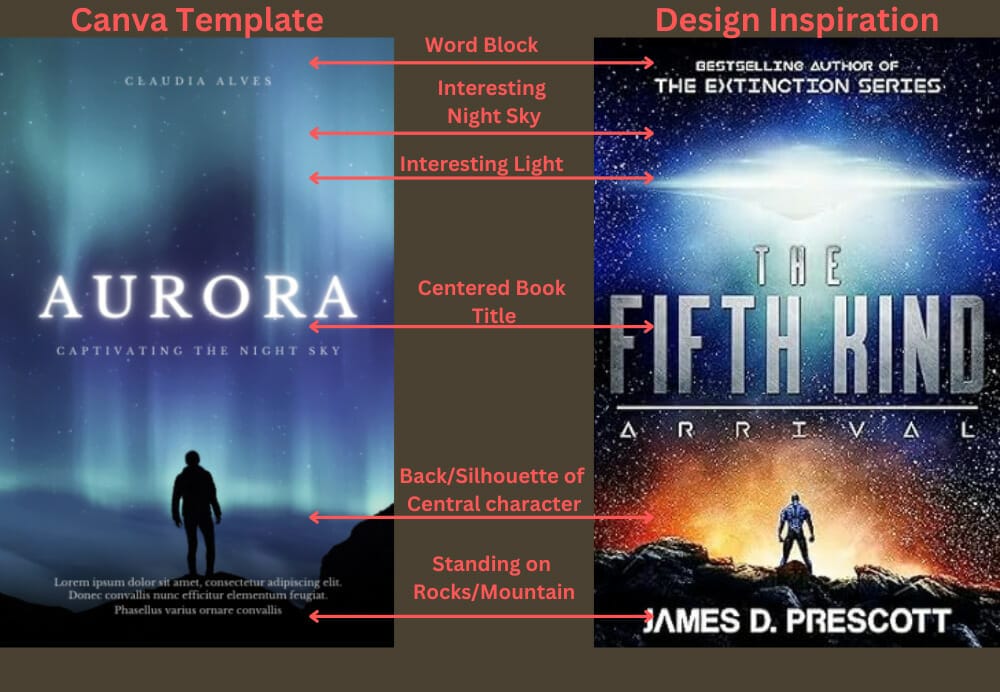
Find a reference for your eBook cover design. For this example, I used The Fifth Kind: Arrival by James D. Prescott for my inspiration cover. Next, look for a customizable template with similar elements.

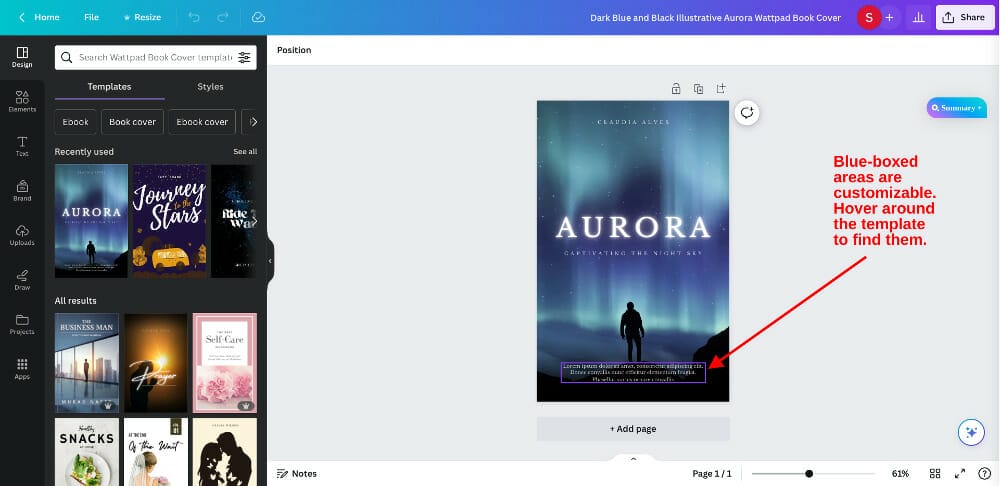
Find your Canva template, and click “apply.” This Canva template is called Dark Blue and Black Illustrative Aurora Wattpad

You can view customizable sections of the Canva template by hovering your cursor over the different parts. If an area is customizable, a blue box will pop up.
This graphic shows the similarities between the template and the inspiration cover.
6. Create an order for your customizations
The order I like to design a cover is:
- background
- central image
- complementary images
- overlays
- text
(Use whatever order works for you.)
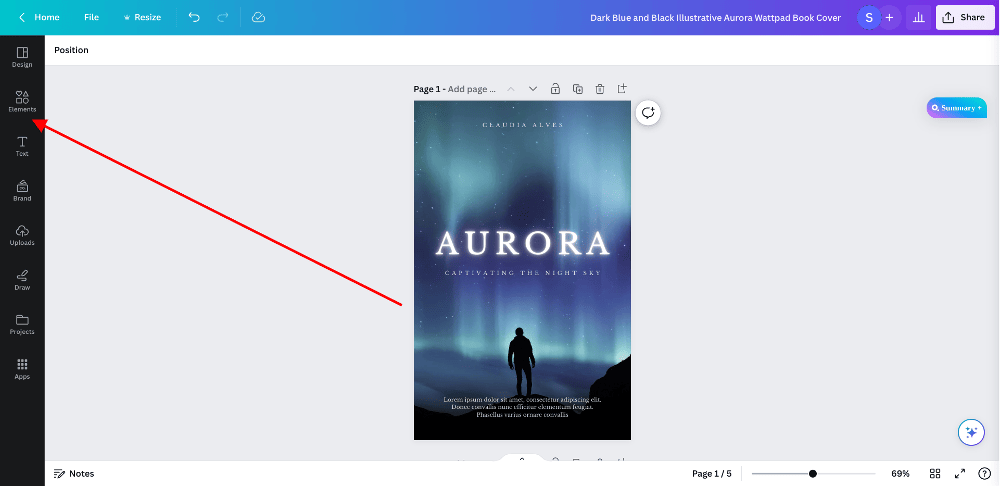
7. Find elements to add
Use “Elements” in the sidebar to find additional graphics
I selected these three.
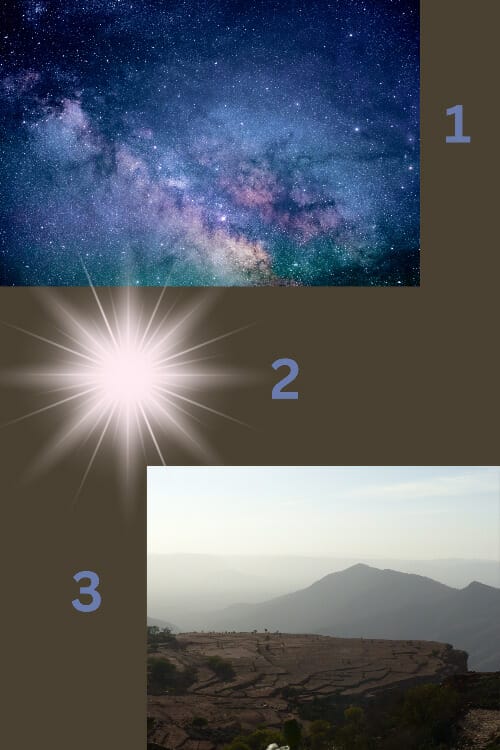
I added the background image “as-is.”

I modified the mountain by removing the background and using the “Outrun” filter and a shadow filter.
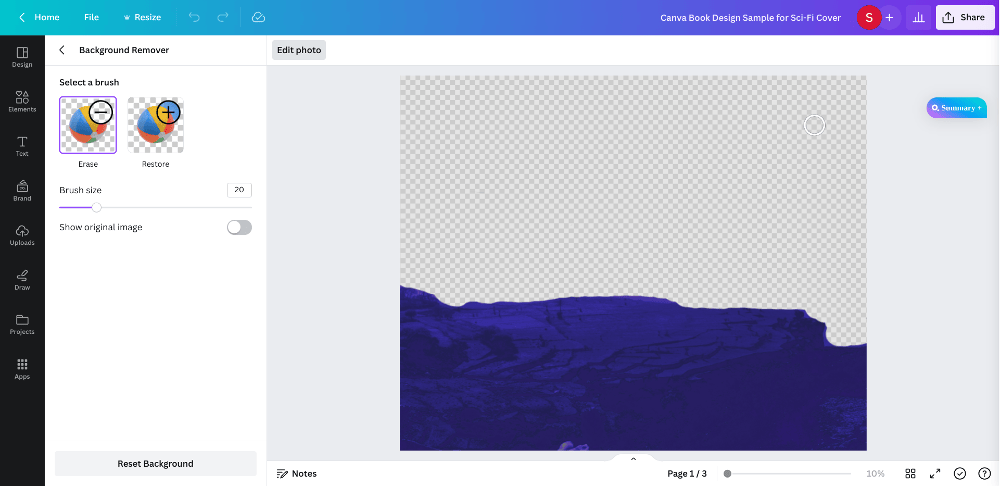
I added the updated image to the background and tilted it to look more like a planet.

I positioned the light element behind the mountain and added an overlay to change the color to black. I stretched it and reduced the transparency to 27.

8. Update the typography
Next, I changed the text (typeface) and added the author name, book title, and blurb.
Title: Elemental: The Last Stronghold
Author: Megan Phillips
Blurb: “The biggest and brightest new voice in the sci-fi genre today” -SBS Weekly
Here’s the final Canva ebook cover design:

How much does an eBook cover design cost?
The price of a cover design can range from free to a thousand dollars. Designing the cover yourself or hiring a designer from a site like Fiverr will cost less than a site like 99Designs or Reedsy. Expecting to pay a few hundred dollars for a professionally designed book cover is standard.
The final cost of your cover depends on factors like the complication of the design, how many edits you request, the experience level, and the location of the
The most cost-effective route is typically to hire the same designer for your ebook cover design, paperback cover design, interior formats, etc., in order to get a bundle discount.
The price of your ebook cover can have a very wide range, so it comes down to your personal goals and where you decide to invest your book budget.
How to hire an ebook cover designer
If you’ve decided to hire a cover designer, the first time will be the hardest. It’s great to put the time into researching anyone you hire before you do so. Whether that’s editors, cover designers, interior formatters, marketers, etc., you’re trusting someone with your career! It should be a partnership, so choosing the right person and making sure you keep open communication will save you a lot of time and stress later down the road.
Here are a few tips to keep in mind for hiring a designer for your ebook cover:
- Make sure you do your research on the designer, read through their testimonials, and see examples of their previous work. Bonus points if you can find testimonials that aren’t directly from the designer’s website. (Try searching their mentions on Twitter for a starting place in your research.)
- Look for bundle deals to save money. (That said, look out for tacking on too many of those “extras.” For example, many designers offer add-ons like audiobook covers and the Photoshop file of your design—you don’t need both! It’s easy to format the cover into a square for your audiobook cover if you’re already adding on the Photoshop file.)
- Be open and communicative about what you want. While being cordial is a must, your designer can’t read your mind! Be clear and direct with your expectations.
- If you disagree about something, be sure to hear your designer out on their opinions. After all, you hired a professional because they know more than you! That doesn’t mean rolling over for anything they think is best, but try to keep an open mind and appreciate the expertise you’ve paid for.
- If you’re happy with their design job, hire them again! Finding people you love to work with can be difficult in any industry, so keeping connections with people you like to work with can save you grief in the long run.
- If you’re unhappy with the job they did or your personalities didn’t mesh, don’t be afraid to shop around for someone else on your next project. The cost-effectiveness of keeping the same designer doesn’t matter if you aren’t happy with their performance.
Next steps
Getting your eBook cover right can have a direct impact on how well your book sells. Whether you design the cover yourself and invest your time or hire the best professional you can afford and invest your dollars, it’s worth it.
At Self-Publishing School, we offer in-house book cover design, as well as other done-for-you services. If that’s what you need, book a call with our team and let’s discuss how we can help you.
Figuring all of the ins and outs of self-publishing can be tough, but that’s why we’re here. We know what it takes to get you moving in the right direction as an author. Now, let’s get that masterpiece designed and published!
The original article written by Hannah Lee Kidder has been updated.